10 Best Learning and Development (L&D) Tools in 2026
This guide dives into the top 10 learning and development platforms of 2025, offering a comprehensive overview for HR and L&D managers.
Whether you’re looking to upgrade your training approach or select a new L&D solution, our roundup, complete with real user reviews, will light the way.
What to look for when choosing training content development platforms
Before diving into specific platforms, let’s establish the key criteria that separate good tools from great ones. When evaluating training content development platforms, focus on these essential factors:
Content creation capabilities
Look for platforms that support interactive elements like quizzes, branching scenarios, simulations, and multimedia integration. The best tools offer drag-and-drop interfaces, customizable templates, and the ability to create engaging content without extensive technical skills.
Technical standards and integration
Ensure your chosen platform supports e-learning standards like SCORM, xAPI (Tin Can), and cmi5 for seamless LMS integration. Mobile responsiveness and API connectivity are non-negotiable for modern learning environments.
Use case alignment
Consider your specific training scenario: Are you building content for employee onboarding, compliance training, customer education, or partner enablement? Different platforms excel in different contexts—some are built for rapid deployment, others for complex, highly interactive experiences.
Collaboration and workflow
Disclaimer: Please note that the solutions(competitors’/softwares’ features) we review may change over time. If you have updates or new features to share,If multiple team members will create content, prioritize platforms with version control, multi-author support, review workflows, and real-time collaboration features.
What is a learning and development platform?
A learning and development (L&D) platform is an integrated suite of digital tools or software aimed at enhancing the educational and training processes within an organization.
From onboarding new hires to fostering continuous professional growth, L&D platforms equip organizations with the means to develop a knowledgeable and skilled workforce.
What are the different types of L&D tools?
- Learning management system (LMS): A comprehensive tool that manages all aspects of the learning process, from course creation and delivery to tracking learners’ progress and performance. LMSs offer personalized learning experiences, enabling organizations to tailor training to individual needs and objectives.
- Learning experience platform (LXPs): LXPs put the power of learning in the hands of employees by offering them a more personalized and engaging experience. Unlike traditional LMSs, LXPs recommend content based on the learner’s behavior, preferences, and needs to foster a proactive learning culture. This approach aligns closely with the 70:20:10 learning model.
- Knowledge base: A centralized repository for storing and sharing organizational knowledge and information. It simplifies access to reference materials, guides, SOPs, and policies, supporting employees in real-time task-completion and problem-solving.
- Course authoring platforms: These platforms provide tools for creating interactive and engaging e-learning content. They allow trainers and subject matter experts to design courses with multimedia elements, quizzes, and simulations to enhance the learning experience.
- Microlearning platforms: These platforms are focused on delivering short, targeted learning modules. They support knowledge retention and provide learners with immediate access to necessary information, making it best suited for busy work environments.
- Online course providers: Platforms like LinkedIn Learning and Udemy offer a vast library of courses covering various subjects. These providers are well-suited for organizations looking to give employees access to new skills and knowledge without the need for custom content creation.
With the right mix of these learning tools, companies can create a comprehensive L&D program that addresses immediate employee training needs.
10 of the best L&D tools
| LMS Software | Best for | Top feature |
| 1. Docebo | Scalable and personalized L&D for employees, customers and partners | AI-powered learning paths for tailored training experiences |
| 2. iSpring Suite | Creating learning content quickly with AI assistance. | PPT to SCORM conversion and interactive assessments. |
| 3. LearnUpon | Learner engagement through notifications, mobile apps, and gamification. | Mobile app for iOS and Android with forums and course recommender. |
| 4. LinkedIn Learning | Desktop and mobile app experiences with personalized course recommendations. | Personalized, data-driven course recommendations. |
| 5. TalentLMS | Course creation and management for employee training. | Drag-and-drop course creator. |
| 6. Adobe Captivate | E-learning authoring with a focus on accessibility. | Ready-made layout slides. |
| 7. Udemy Business | Building custom courses with certifications. | Course builder and certification functionalities. |
| 8. GoTo Webinar | Hosting engaging webinars with extensive planning and promotion tools. | Pre-recorded events and flexible scheduling for larger audiences. |
| 9. ProProfs Knowledge | Content authoring and management with a focus on collaboration. | Content authoring with rich text editor and multilingual support. |
| 10. Learning Pool | Self-driven development journeys with AI-powered skills building. | Skills Builder and Automation for personalized development paths. |
1. Docebo
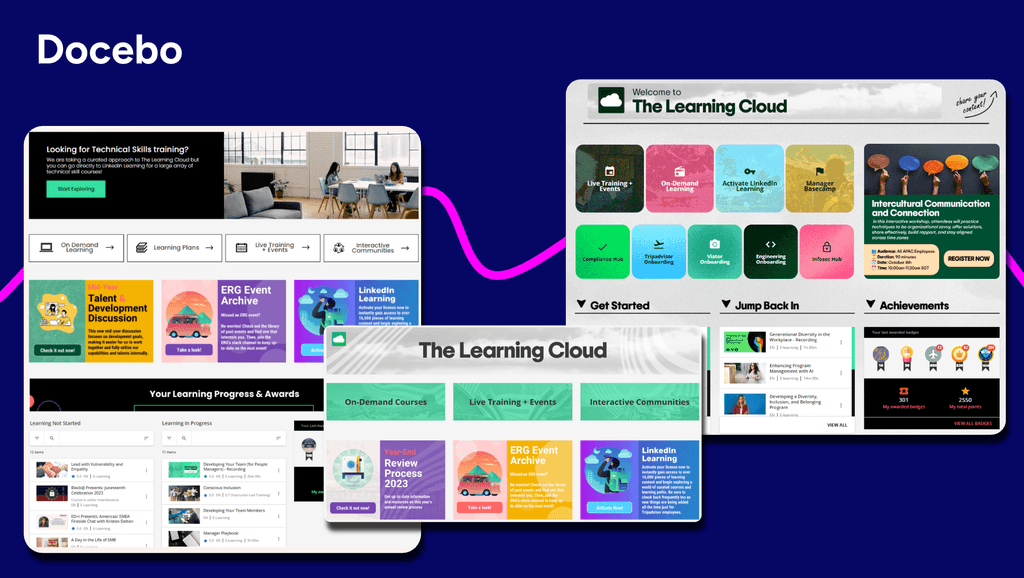
Docebo is a cloud-based corporate training platform designed for talent development, employee onboarding, compliance training, and sales enablement.
The platform enables AI-powered learning experiences that adapt to each employee, offering the right training and content management at every learning stage.
It incorporates elements like badges, leaderboards, and rewards to motivate and engage learners.
Its learning data and insights capabilities allow organizations to collect feedback and measure training effectiveness, helping them link learning outcomes to business performance.
The platform also connects and syncs with existing HRIS or CRM systems, either natively or via API, to allow organizations to create custom reports when needed.
Notably, Docebo Content Marketplace allows L&D administrators and learners to access up to 75,000 online learning courses with SCORM from content providers such as LinkedIn Learning and Skilla.
Top Features
- Gamification elements like badges, leaderboards, and rewards.
- Access to 75,000 online learning courses with SCORM from popular content providers.
- Native or API integration with existing HRIS or CRM systems.
- Blended learning capabilities include instructor-led training (ILT), webinars, online training, and virtual classroom sessions.
- Pre-built SSO and authentication connectors.
| What users like about Docebo | What users dislike about Docebo |
| “Docebo provides a flexible and intuitive platform that supports a wide range of training needs. We use it for compliance courses, customer product training, and partner/distributor enablement. The ability to publish centrally and make our content visible to separate audiences and deliver personalized learning paths is a major plus. The reporting tools are also helpful for tracking progress and ensuring accountability.” – Verified User in Medical Devices, August 22, 2025 “Docebo LMS has transformed the way we deliver training! It’s intuitive, flexible, and packed with smart features that make learning engaging and measurable. The customization options, powerful reporting, and responsive support team make it a game-changer for our L&D programs.” – Ashley H., August 15, 2025 | “With high customization comes complexity[…] As a smaller organization, we do not have multiple L&D experts where one could manage the LMS and another could focus on content building, training, etc. It does take some time to learn the platform, and sometimes it takes a couple of tries to figure out how it all works.” – Verified User in Transportation/Trucking/Railroad, August 7, 2025 |
Best suited for
Docebo’s adaptability makes it ideal for evolving businesses who need scalable yet personalized L&D for multiple audiences.
2. iSpring Suite
iSpring Suite is a learning platform designed for channel partner training, compliance training, and onboarding.
The platform includes an AI assistant that allows organizations to generate relevant course ideas, guides, and quiz questions swiftly.
Its PPT to SCORM conversion capabilities make converting PowerPoint presentations into online, mobile-ready courses easier.
iSpring Suite offers 14 question templates for building quizzes with branching scenarios and flexible scoring to assess learner comprehension.
Additionally, it provides access to over 90,000 templates, images, and characters to help build courses with high visual appeal.
Top Features
- AI assistant for course creation.
- PPT to SCORM conversion capabilities.
- Offers 14 question templates for building quizzes.
- Branching scenarios and role-play conversations.
- Content library with access to over 90,000 templates, images, and characters.
| What users like about iSpring | What users dislike about iSpring |
| Good interface, many opportunities to create high-quality courses, it’s convenient to track employee progress, it’s great that you can purchase the Suite and create awesome materials.” – Kira A., June 2025 “iSpring Learn is easy to implement and easy to use. Getting new users up and running is simple and doesn’t require much training.” – Verified User in Education Management, May 2025 | “The report format for all employees is inconvenient (it would be better to have a division by departments, as everything is mixed together right now). The organizational chart is not flexible.” – Kira A., June 2025 |
Best suited for
iSpring Suite is best suited for converting existing PowerPoint slides into engaging courses.
3. LearnUpon
LearnUpon is an LMS designed for employee, customer, and partner training.
Its native course builder allows for the creation of interactive courses and supports a variety of multimedia content.
The platform’s SCORM and xAPI compatibility with a wide range of e-learning content makes it easier for organizations to integrate and track external learning resources.
Additionally, its comprehensive user management features, such as automation, groups, dynamic rules, and bulk upload, streamline the administration of large numbers of users.
Top Features
- Native course builder functionality.
- SCORM and xAPI compatibility.
- Instructor-led training (ILT) function, including scheduling, attendee tracking, and resource allocation.
- AI-powered assessments.
- Comprehensive user management features.
| What users like about LearnUpon | What users dislike about LearnUpon |
| “We like that LearnUpon LMS provides one central location for learning resources and development, making it easy to follow. ” – Troy C., February 2026 “I like the look of the interface. I think the interface looks very user-friendly and easy to navigate. I also like how easy it is to create courses.” – Kirsty A., February 2026 “I like that LearnUpon LMS helped us take our online training to the next level and provided new options for the organization we work with. It’s clean and simple, which is a big plus.” – Leisa H., February 2026 | “Features change in ways that disrupt the way we do things and don’t seem to benefit our use case. There are little things like course connection when copying courses in the LMS, which makes us have to use two portals to disconnect the courses.” – Verified User in Health, Wellness and Fitness, February 2026 |
Best suited for
LearnUpon’s support for SCORM and xAPI standards and ILT management capabilities best suit self-paced and live training.
4. LinkedIn Learning
LinkedIn Learning is an online learning platform designed for business, higher education, and government institutions.
It has a course library of over 21,000 courses available in 24 languages, covering in-demand business, tech, and creative skills.
The platform allows organizations to tailor learning experiences with custom content, collections, and defined learning paths.
Top Features
- Course library with over 21,000 courses available in 24 languages.
- Provides sandbox environments and Nano Tips for practical learning and skill application.
- Customizable learning paths.
- Career development tools with career path exploration, role guides, and internal job postings.
- Offers integration with LinkedIn.com and Microsoft Teams.
| What users like about Linkedin Learning | What users dislike about Linkedin Learning |
| “It is very help full for learning and gaining knowledge and also certifications – Prajwal B., January 2026 “The breadth of materials offered is great and you can certainly find something that is relevant to your business or career use-case.” – Charlotte M., August 2025 “LinkedIn Learning has been my go-to platform for brushing up on skills and exploring new ones.” – Joselyn M., August 2025 | “Course depth varies; some topics feel introductory and may not be sufficient for advanced learners.” – Verified User in Consulting, February 2026 “When it comes to truly mastering skills and developing new abilities, I find that most courses are too short and lack in-depth learning. They generally provide a decent introduction, but do not go far enough for those seeking comprehensive understanding.” – Mouloukou K., October 2025 |
Best suited for
LinkedIn Learning’s vast library of courses makes it well-suited for continuous professional development.
5. TalentLMS
TalentLMS is a training software program designed for employee, sales, partner, and cybersecurity training.
The platform uses drag-and-drop functionality to add various course media types while supporting SCORM, xAPI, and cmi5 files for better interoperability.
TalentLMS also offers tools that allow organizations to build quizzes, tests, assignments, and surveys for learner evaluation and material assessment.
Top Features
- Uses drag-and-drop functionality to add various media types to courses.
- Comprehensive assessment tools to build quizzes, tests, assignments, and surveys.
- Customizable learning paths with completion rules.
- White-label options.
- Supports the creation of unlimited sub-accounts.
- Gamification elements include points, badges, and leaderboards.
| What users like about TalentLMS | What users dislike about TalentLMS |
| I really appreciate how TalentLMS integrates AI, which makes it much easier to tailor the training to my specific needs.” – Valeria G., March 2025 “TalentCraft, which is the AI helper in content creation is really really nice. Not only for the content but to make your own content look nicer as it gives the ability to create a training webpage style instead of a blank page with only a video, do next, read, do next, etc. It’s more interactive.” – Sabrina P., November 2024 | “That some features are still not moved from the legacy version to the new version, like the progress tracking and access to tests and survey, which lead to our team having to move from 1 version to another all day based on what tasks we have to accomplish on it.” – Sabrina P., November 2024 |
Best suited for
The platform’s customizability and gamification features are best suited for creating a more engaging and motivating learning environment.
6. Adobe Learning Manager
Adobe Learning Manager (formerly Adobe Captivate Prime) is an e-learning authoring tool designed for business and educational learning environments.
The platform includes a selection of pre-built layout slides for quick course development, with customization options to meet specific training needs.
The platform’s e-learning authoring allows users to copy and paste selected attributes or components across courses easily.
Additionally, organizations can use its modern text-to-speech capabilities and native audio–editing tools to create high-quality voice-overs and audio tracks.
Top Features
- Ready-made layout slides for course development programs.
- E-learning authoring capabilities.
- Simplified interactions panel with an interface for adding triggers, conditions, and actions.
- Supports accessibility standards like Section 508 and WCAG 2.1 for learners with special needs.
- Modern text-to-speech capabilities and native audio–editing tools.
| What users like about Adobe Learning Manager | What users dislike about Adobe Learning Manager |
| “I am able to create administrators for specific team content and modify the access based on what is needed.” – Courtney P. “Between the various options of learning paths, certifications, and more, we can more rapidly deploy user training successfully.” – Connie K. “ALM curates a list of courses based on your most preferred domains and interest areas, and it helps learners view similar courses that they might like to take.” – Madhu G. | “While we are trying to upload the learner details using CSV, if there are some errors with any of the learners, we don’t get the list of erroneous records together. We have to do the upload multiple times, find the error, and then do the re-upload, which is actually difficult.” – Abhirami L. “I think reporting could be more streamlined. It can be cumbersome at times to find the information that I’m looking for in order to report on it.” – Verified user in consumer goods. |
Best suited for
Adobe Captivate’s ability to meet accessibility standards makes it best suited for organizations committed to inclusive learning.
7. Udemy Business
Udemy Business is a learning platform designed for small team, enterprise-wide, tech team, and customer-success team training.
The platform includes a course builder that allows users to host videos and proprietary resources in custom courses.
It offers various courses designed by industry experts to help learners prepare for and achieve certifications in their respective fields.
Additionally, Udemy offers robust user management tools that allow admins to easily create user groups, manage enrollments, and monitor individual and group progress.
Top Features
- Course builder for hosting videos and proprietary resources in custom courses.
- Offers a wide array of courses designed by industry experts.
- Custom learning paths.
- Analytics and insights to identify learning trends.
- User management tools.
| What users like about Udemy Business | What users dislike about Udemy Business |
| “I find many courses that I can easily filter based on my needs like duration and keywords, which is really helpful.” – Verified User in Information Technology and Services, February 2026 “I find the rating and reviews feature really useful as it gives me an insight into the course before I commit fully.” – Rakesh K., February 2026 “What I like best about Udemy Business is the breadth and quality of its course library. It covers a wide range of technical, business, and soft skills, which makes it useful for different roles within a team.” – Dharamveer p., February 2026 | “One thing I dislike about Udemy Business is that the quality of courses can vary depending on the instructor. While many courses are excellent, some feel a bit outdated or not deep enough for advanced users.” –Girishchand B., February 2026 |
Best suited for
Udemy Business’s extensive course library is well-suited for upskilling and professional development.
8. GoTo Webinar
GoTo Webinar is designed for interactive web-based seminars and presentations, online events, training sessions, or large-scale meetings.
The platform offers the capability to pre-record webinars, enabling presenters to deliver high-quality presentations without the need for real-time execution.
GoTo Webinar also supports up to 3,000 attendees joining live streams directly from their browsers.
Top Features
- Offers the capability to pre-record webinars.
- Webcast mode that supports up to 3,000 attendees.
- Integration with GoToStage for event promotion.
- Engagement dashboard for presenters to monitor audience engagement and manage the event’s pacing.
- Comprehensive reporting and analytics post-event.
| What users like about GoTo Webinar | What users dislike about GoTo Webinar |
| “I like that GoTo Webinar is straightforward to use and offers an intuitive setup.” – Verified User in Computer Software, March 2026 “It’s very easy to set up and manage webinars, scales well for large audiences, and includes useful engagement tools like polls and Q&A to keep attendees involved.” – Tilak M., December 2025 “Even as a first-time user, I joined the webinar without any setup headaches. The interface was clean, intuitive, and didn’t require extra downloads or confusing steps.” – Erika R., October 2025 | “Customer support is impossible to reach and is completely outsourced.” – Forrester S., October 2025 “As a guest speaker, I couldn’t personalize my display name or background as much as I wanted. It would be great if guests could have more customization options” – Erika R., October 2025 |
Best suited for
With capabilities for pre-recorded and live streaming, GoTo Webinar is best suited for the needs of marketers, trainers, and event organizers.
9. ProProfs Knowledge Base
ProProfs Knowledge Base is designed to create, manage, and share documents, FAQs, help articles, and guides to support both internal team members and external customers.
The platform ensures knowledge base accessibility on various mobile devices, including laptops, tablets, or smartphones.
It also features built-in SEO tools organizations can use to optimize content for search engines, increasing the visibility of help articles and guides.
Additionally, it supports content translation in over 90 languages, catering to a global audience and diverse customer base.
Top Features
- Knowledge base accessibility on various devices, including laptops, tablets, or smartphones.
- Features built-in SEO tools to optimize content for search engines.
- Provides robust security features such as password protection and privacy controls.
- Supports content translation in over 90 languages.
- Offers detailed analytics and reporting tools.
| What users like about ProProfs Knowledge Base | What users dislike about ProProfs Knowledge Base |
| “Friendly and straigthforward interface for creating structured, shared user manuals. Great live support.” –Dominik D., June 2024 “ProProfs replaces a legacy tool that requires content build and deployment before changes are visible to customers. I like ProProfs’ straightforward approach to content creation, editing, and publishing. Content updates can be pushed immediately.” – Verified User in Logistics and Supply Chain, March 2024 | “Currently, only the account owner receives notifications about documents pending publishing. Ideally, this notification could be forwarded to various editors based on their subject matter expertise.” – Verified User in Logistics and Supply Chain, March 2024 |
Best suited for
With its SEO-ready features and powerful analytics, ProProfs is well-suited for improving content visibility and engagement.
10. Learning Pool
Learning Pool is an L&D platform designed for onboarding, compliance training, and upskilling.
The platform offers a blend of workflows, mentors, and social learning to encourage active engagement and self-directed learning.
Its skills builder uses AI to assess current skills and guide employees toward acquiring the necessary skills.
Additionally, Learning Pool features a dedicated learning record store (LRS) for full control over learning data.
Top Features
- Offers a blend of workflows, mentors, and social learning for active engagement and self-directed learning paths.
- Al-powerd skills builder.
- Advanced data visualizations and predictive analytics features.
- Authoring tool for the creation, editing, and branding of course content.
- Dedicated learning record store (LRS) for learning-data management.
| What users like about Learning Pool | What users dislike about Learning Pool |
| “I love the Learning Pool – Platform for its ease of use and the capability to curate all types of learning resources in a course, which goes beyond just SCORM packages.” – Kirstie C., November 2025 “The LMS is capable of being very easy to use, as long as you put the time in to set it up properly.” – Samuel D., October 2025 | “I find the initial setup process of Learning Pool Platform a bit complicated due to the need for customization. Additionally, the LMS doesn’t meet all my reporting needs” – Harriet H., October 2025 |
Best suited for
Learning Pool’s dedicated learning record store is well-suited for detailed tracking and reporting.
Choosing the right platform for your use case
With so many options available, matching the right platform to your specific training scenario is crucial. Here’s how to approach it:
For enterprise-scale deployment
Organizations training multiple audiences (employees, customers, partners) across different regions benefit from platforms like Docebo that offer extended enterprise capabilities, AI-driven personalization, and robust analytics.
For rapid content conversion
If you’re converting existing PowerPoint presentations or documents into online training, platforms like iSpring Suite or TalentLMS offer streamlined workflows that minimize development time while maintaining content quality.
For complex, interactive training
When you need branching scenarios, simulations, or software training, consider authoring-focused tools like Adobe Captivate or specialized platforms that support advanced interactivity and custom logic.
For budget-conscious teams
Smaller organizations or teams with limited budgets can leverage platforms with free tiers or open-source solutions, while still accessing professional-grade authoring capabilities and learner tracking.
Benefits of using L&D platforms
The benefits of investing in L&D platforms are clear and multifaceted, impacting employee retention and the broader organizational performance and competitiveness.
With L&D platforms, you can:
Retain top talent
The modern workforce constantly pursues better professional development opportunities, a trend particularly evident among millennials.
A Gallup report revealed that 59 percent of millennials say opportunities to learn and grow are extremely important to them when applying for a job.
According to LinkedIn, 93 percent of organizations are concerned about employee retention — and the number one way organizations are working to improve retention is by “providing learning opportunities.”
The message is clear: to retain top talent, employers must invest in L&D opportunities that cater to these evolving expectations.
Close skill gaps
L&D platforms offer upskilling and reskilling opportunities, allowing employees to stay ahead of industry trends and technological advancements.
In fact, according to a LinkedIn report, 79 percent of L&D professionals agree it’s less expensive to reskill a current employee than to hire a new one.
By investing in L&D, organizations can also ensure their workforce remains competitive and capable — preparing their teams for the challenges of tomorrow.
Boost customer satisfaction
Organizations can improve customer service quality by equipping employees with the necessary skills through targeted training programs.
Additionally, L&D strategies can include customer-focused training, such as product training through webinars, online tutorials, and e-learning courses.
This dual approach improves service delivery and empowers customers, leading to a notable increase in customer satisfaction KPIs.
Scale growth
Engaged employees, who feel supported in their career development, tend to be more productive.
A study found that 56 percent of HR managers believe training and development to be an essential business enabler.
Given that L&D initiatives are a key driver of employee engagement, the link between L&D and enhanced employee performance — and by extension, organizational growth — is clear.
For SMEs, in particular, L&D offers a way to gain a competitive edge without the need for large recruitment budgets.
Plus, L&D is key in navigating change and transitions, supporting organizations in achieving new business goals, and adapting to market shifts.
How to choose the best learning and development software systems
Here’s a step-by-step guide you can use to ensure you invest in a system that truly meets your requirements:
Identify your L&D goals
Consider the types of learning content that will best serve your audience, from detailed online training courses to concise microlearning modules.
Then, reflect on the skills you aim to develop or improve within your workforce and how these match your company’s culture and strategic objectives.
Assessing the impact of your L&D programs is also crucial, requiring a learning plan for evaluating your staff’s needs, interests, and goals.
This foundational step helps identify a platform that can, for example, incorporate gamification for a workforce enthusiastic about interactive learning experiences.
List key features that align with your L&D needs
Pinpoint essential features that your L&D platform must have to meet your identified needs.
These features might include:
- Customizable learning paths
- Content authoring tools
- Mobile app compatibility
- Comprehensive reporting and analytics
- Social learning capabilities
- Gamification elements
- Options for assessment and certification
Ensuring that your chosen platform can support these functionalities will help in creating engaging, effective, and measurable learning experiences for your employees.
Consider your budget and resources
Evaluate both the initial and ongoing costs associated with implementing and maintaining the L&D platform.
This includes expenses related to content creation, licensing, and support services.
Go for L&D solutions that balance cost-effectiveness and functionality, ensuring they provide a solid return on investment.
Transparency in pricing and flexible payment options, such as monthly or annual billing, should also influence your decision.
Evaluate your options
When comparing different L&D software options, consider factors like:
- Scalability
- Ease of use
- Customization possibilities
- Integration with existing systems
- The provider’s reputation
A support package encompassing onboarding, training, and ongoing technical assistance is also essential.
The chosen vendor should offer a support model that suits your organizational requirements and budget, ensuring the long-term success of your L&D initiatives.
Over to you
Selecting the best L&D software system requires a thoughtful analysis of your organization’s specific needs, goals, and budget.
Whether you’re looking to close skill gaps, enhance employee development, or streamline your training processes, we encourage you to explore Docebo’s possibilities.
Schedule a demo today to discover how Docebo can help you empower your workforce with the skills they need to succeed.