Go to content

How to Develop a Winning Enterprise Learning Strategy for 2025

You want to hire great employees. But even more, you want to keep developing those employees through ongoing learning programs and initiatives. 

Of course, even the best employees don’t just become avid learners on their own. They need help in the form of a targeted learning experience that caters to their learning needs and creates an ecosystem of development. 

You need an enterprise learning strategy.

Sounds easy? Think again. Deloitte estimates that the average employee spends less than 1% of their workday on enterprise-level upskilling or other types of learning experiences. 

Docebo’s research also has shown that 70% of the learning undertaken at organizations occurs outside work hours.

Without opportunities to learn in the workplace, 67% of employees are more likely to switch to a new employer. 

That’s probably why, according to PwC’s latest CEO Survey, 80% of business leaders cite an organizational need for new and improved skills as their biggest business challenge.

Also, enterprises are expanding, looking beyond internal training. Docebo’s internal data shows that enterprises are growing in use cases. 

While onboarding and talent development remain priorities, external use cases like customer education and partner enablement have nearly doubled.
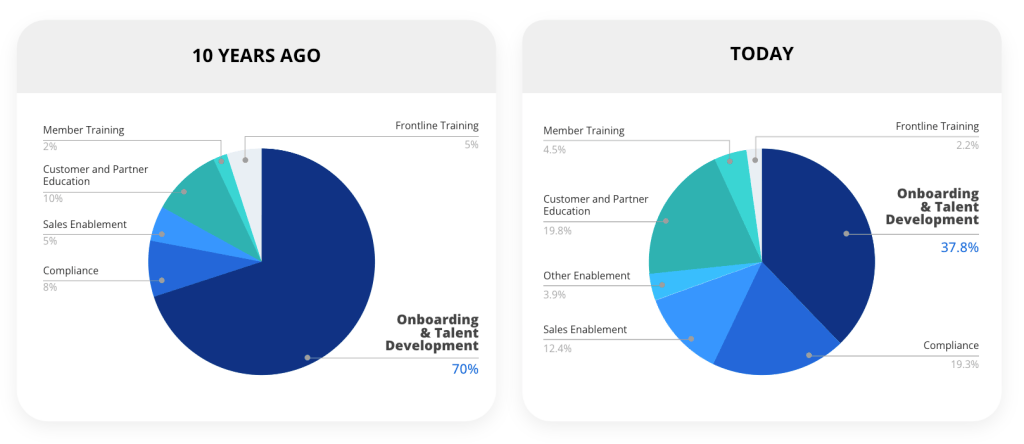
learning use cases  trends by docebo

Docebo’s data shows that companies’ external use cases have significantly grown in the past decade.

We know that building a true learning culture is powerful. 

So, let’s discuss how you can achieve this by building an enterprise learning strategy that drives employee engagement at every level of your organization and fosters a dynamic learning culture for customers and partners alike.

1. Define the desired outcome of your enterprise learning strategy

First, and perhaps most importantly, you have to define exactly what you want to get out of your enterprise learning strategy. 

That might even start at the very beginning by defining what the strategy actually is: a clear outline of how your company will carry out internal and/or external learning initiatives. 

Will you educate your employee stakeholders, from onboarding and teaching new skills all the way to retention and closing skill gaps? 

Will you extend your learning initiatives to include customer education and partner enablement?

Your learning strategy might hit on a wide range of topics, including:

  • The current training needs of your employees, focusing primarily on the current gaps that a training strategy might be able to close
  • Whether the focus should be more closely tied to new employees, existing employees, or both (probably both)
  • The learning preferences of your employees, including definitions of whether learning opportunities should occur online, in-person, or elsewhere
  • The current needs of your customers
  • The resources and materials your partners need
  • Specific learning and training materials to enable your sales staff to succeed
  • The learning solutions you might look to implement to achieve your learning objectives, typically in the form of a learning management system (LMS), microlearning platform or an AI-powered learning platform

Once you understand the broader components of your learning strategy, goals become easier to define. For example, you might want to focus on developing specific new skills or a broader culture of continuous learning.

Define them early so that your entire strategy can derive from them. Better yet, an early outline of your goals also ensures you have plenty of time to align them with your business goals. 

Then you can more deeply engrain your professional development efforts into your everyday and strategic operations.

2. Assess your current learning gaps

Next, it’s time to outline precisely the gaps your organization has that an enterprise learning strategy can solve.

That means you have to get your teams involved. Identifying learning gaps requires performing a comprehensive skills assessment and comparing the results to the skills your teams should have to be successful.

Think about it as a more comprehensive version of a basic needs assessment. In addition to asking your company leadership and department heads about the skills they want their team members to have, you also learn exactly what skills currently exist within your various functional areas.

Naturally, the areas where the gaps are the most significant are where your skills development efforts can begin to hone in.

If you already have an AI-powered learning platform, you may already have ideas of what skills are available in your organization.

3. Identify employee preferences for potential training programs and formats

Of course, an enterprise learning strategy is never just about the what. The how matters just as much as you look to optimize your employee development efforts.

In other words, how exactly do your teams want to learn? Do they prefer an e-learning platform for online engagement or more in-depth webinars? 

Or are they still most comfortable with in-person training content? What about social learning—or simply getting through some instructional modules on their own time?

Sure, you can follow general trends in enterprise learning, which will generally lead you in the right direction. But the real key to unlocking learner engagement is to customize training for your employees. 

This is impossible without their input.

Ask them how and where they want to consume training materials. You can even ask them what that learning content should look like. 

As you begin to get answers, you can learn more about your employees and how to build a training program and format to which they’ll respond positively.

Getting feedback about learning can also be done easily through an AI-powered learning platform that also includes advanced analytics so you can easily assess the impact of your learning strategy.

4. Create clear lines of ownership for employee training

To be truly successful, any enterprise learning strategy has to be embraced and prioritized by the entire organization.

From senior leadership down, every supervisor should be able to encourage and empower their teams to participate and leverage the learning resources at their disposal.

But it goes beyond generalized buy-in for the strategy as a whole. Your strategy should identify several key learning and development (L&D) leaders who will be responsible and accountable for its implementation and success.

These leaders may be part of the formal org chart hierarchy. However, especially in less vertical organizations, they might also be informal leaders who just want to embrace a comprehensive learning culture and strategy.

No matter the scenario in your organization, the key is that these leaders are empowered to drive the organization and culture toward the desired learning outcomes. 

From choosing the learning technology to helping to build the training and all the way to promoting learning opportunities to your team, these leaders will be the driving force behind a successful implementation.

5. Choose the right LMS or learning platform for your learning environment

No enterprise learning management can succeed without a powerful platform specifically designed to help with the implementation. 

You’re probably already familiar with remote training software, but similar platforms are just as crucial for in-person learning opportunities.

That’s because their benefits are immeasurable. They help you track participation and engagement according to clear metrics.

 They come equipped with templates and some AI-powered learning platforms also come with AI authoring capabilities that make building individual learning modules easier. 

And, of course, they can make learning more fun through gamification and social learning experiences that amplify communities within the workplace to share tacit knowledge and strengthen organizational knowledge.

To get there, though, you have to find the right option. Choose an LMS or learning platform that specifically matches your needs. 

Keep your learning gaps, employee preferences, and overall strategy in mind.

Spend plenty of time to vet all of your options to ensure that, by the time you make your choice, you can be confident that the platform will help your employee training strategy succeed.

6. Design learning journeys aligned with employee and corporate learning needs

With the right platform in place, it’s time to get to the implementation. That means building the modules, certifications, microlearning opportunities, and overall learning journeys you have identified as vital in the above steps.

At the enterprise level, extended enterprise learning becomes a crucial concept to follow. It wraps in all of your internal and external stakeholders for a comprehensive training program that everyone can benefit from, including external audiences like customers and partners.

It’s not just about expanding your audience, of course. More importantly, it’s about designing those overarching learning journeys. This can drive new employees through the onboarding process and existing employees through continuous learning opportunities.

Ideally, each learning journey is modular but still unique to its target audience. Individual modules might be relevant to multiple journey types but are arranged and grouped differently according to those unique needs. 

That keeps the content relevant, maximizes engagement, and drives better learning outcomes.

7. Build an assessment strategy to assess employee learning against your KPIs

Finally, any strategy worth its salt needs an assessment component. 

Once you have built assessments and evaluations, which you can easily do with a learning platform, you can check back on your implementation periodically to ensure everything is working and succeeding as intended or make adjustments where necessary.

At its core, this assessment strategy must define exactly what key performance indicators (KPIs) and metrics you want to track. It should also include a connection between these metrics, your overarching business goals, and a time frame within which you will check back and report on its success.

Typical enterprise learning KPIs might be:

  • Training attendance and engagement
  • Average time spent on the platform or in a given module
  • Course completion rates
  • Job performance benchmarked before and after the training

They can then connect back to your business goals of better employee engagement, retention, and productivity.

The assessment strategy should also be adjustable. If you find any KPIs difficult to quantify or irrelevant to those larger goals, consider going back and making adjustments to increase that relevance level.

Case study: Implementing an enterprise learning strategy with KCF Technologies

KCF Technologies, based in the US, specializes in advanced industrial machine monitoring solutions like SMARTdiagnostics. 

To maximize the benefits of KCF’s product and its valuable data, customers need training and continued collaboration with KCF’s team.

Initially, they considered traditional training, but logistical challenges and limited trainers made it unfeasible. 

YouTube was another option, yet it lacked the ability to track, validate, and certify learning, essential for compliance that their customers needed. 

This led KCF to adopt a comprehensive learning platform, which enabled them to deliver training to customers effectively while tracking progress. 

The company also realized that this new learning platform not only allowed them to achieve the original goal of educating customers, but also could extend to training employees, vendors, and potential investors.

With a central Repository, KCF can easily store and replicate course content within the learning platform, allowing them to create tailored training learning journeys for both customers and employees. 

With great potential for customization, KCF now leverages their new learning platform to build distinct learning paths and environments for different user groups. 

Additionally, they’ve also utilized localization tools and extensive language capabilities to support international users by providing training in their native languages, enhancing accessibility and engagement.

The outcome? Over $1.5 million saved in training costs and 12,000+ hours of engaged learning for over 4,300 customers. Employees have also greatly benefited, having completed over 23,000 courses.

The company has seen that their most successful customers are the ones who stay actively engaged within the learning platform. They learn to use their product more effectively, make smarter decisions about plant operations and machine maintenance, and as a result, see improved performance and increased profitability.

Develop an extended enterprise learning strategy to drive retention and engagement

It’s time to take your training efforts to the next level. With the right enterprise learning strategy, you can build a comprehensive culture of learning, just like KCF Technologies did, that will proliferate across your teams and positively impact your company’s performance.

But of course, it all starts with the right learning partners, and the right learning platform and that’s exactly where Docebo comes in.

With scalable, personalized learning powered by AI and deep automation, we’ve built a powerful learning platform for enterprise applications. 

Take a tour to see the platform in action, and see why Docebo is trusted by over 3,800 companies like KCF Technologies, and by 30,000,000 learners worldwide.

Maria Rosales Gerpe

L&D Content Writer

How to Evaluate a Training Program in 6 Simple Steps

The most impactful training program is one that clearly demonstrates results. But how can you achieve that?

If you want to make sure that you’re presenting an effective training program, it’s important to conduct a training program evaluation.

Training program evaluations give you a better idea of how your learners are performing and how well they’re absorbing the material presented in the lessons so that they can go on to use it successfully in the future. 

But many people do not know where to start with an effective training program evaluation—or even what metrics they should use. 

If you want to understand your training effectiveness better, use these simple steps to assemble a training evaluation.

1. Establish your training needs

Your evaluation model should focus on what you need your learners—employees, customers, or partners—to gain from the program. 

To get a good return on investment for your training program, you need a program that focuses on your company’s needs. 

Throughout the evaluation process, you want to focus on what your company is actively trying to accomplish with your training program. Consider:

Depending on what you are attempting to accomplish and how extensive those programs are, you may have a variety of goals for your training programs and learning plans

However, to conduct an effective training evaluation, you must start with your core goals.

2. Create metrics for measuring changes

If you want to observe the effectiveness of your training program through a training program evaluation, you need to clearly lay out what metrics or key performance indicators (KPIs) you will use to calculate the effectiveness of employee training modules. 

Here are some metrics or KPIs to consider:

  • Measuring completion rate and drop off rates to indicate how many learners complete the course versus those who drop out, signaling potential content engagement or pacing issues
  • Analyzing pre- and post-course assessment scores to gauge the improvement in learner knowledge or skills
  • Measuring learning outcomes to determine whether your training program is delivering the right content
  • Tracking how employees develop and use new skills as a result of their training
  • Establishing how job performance changes as a result of the training employees have received
  • Tracking behavioral changes as a result of some types of training, like diversity and inclusion training or safety training
  • Considering employee engagement, both with the training program and with their jobs when the training is done

Measuring training effectiveness starts with establishing what you need to measure and how you will calculate it. 

With those key metrics in place, you put yourself in a better position to evaluate the actual goals accomplished from utilizing those training models.

3. Select your training program evaluation model

You can choose from several models when measuring your training program’s effectiveness. Select the training program evaluation model that works best for your needs.

The Kirkpatrick Model

The Kirkpatrick Model focuses on measuring four critical areas of learning and development:

  • Reaction, or how much employees enjoy the training program and how engaged they are with the learning experience
  • Learning, or what employees absorbed from the training program and whether they absorbed the learning objectives
  • Behavior, or how behaviors or processes change as a result of engaging in the training program
  • Results, or whether the training program accomplished its intended goals

Through the Kirkpatrick Model, employers can take a nuanced look at each stage of the training process. 

By using the Kirkpatrick model, you can identify strengths and weaknesses within the training program and allow you to make modifications as needed.

The Phillips ROI Model

The Phillips ROI Model builds on the Kirkpatrick model while focusing on what matters most to many organizations: the return on investment (ROI) for the company.

If you have spent a considerable part of your budget on training, you want to know that it has helped you accomplish your business goals. 

The Phillips ROI Model adds a cost-benefit analysis to measure the monetary benefits of the training program.

This can help team members better establish the need for that type of training and argue in favor of maintaining programs that are accomplishing their goals.

The Phillips ROI Model requires you to gather data about employee performance and knowledge before training begins to effectively calculate the benefits of training when you compare those results to post-training competency across your learners.

Anderson’s Model

Anderson’s training program evaluation model looks at the following three key factors to determine a training program’s effectiveness:

  1. Alignment—is training aligned with your company’s overall business goals?
  2. Employee performance—is training contributing to employee learning and improving overall employee performance?
  3. Effective training—is the training approach the most effective for your organization? 

Anderson’s Model closely examines the overall impact of the training and conducts an in-depth look at instructional methods.

Selecting the right training model

As you consider the methods you will use for your training evaluation, carefully consider how they align with your KPIs. 

Each training program evaluation methodology breaks down the evaluation of training a little differently, so it’s key to ensure that your chosen method aligns with both the training methods you have chosen and the overall goals for your company.

4. Check the age of your training content

It’s easier than you may think for companies to end up with outdated training materials. 

You have a training course that works. It’s great for onboarding new employees, taking them through health and safety content, or ensuring they understand the company’s goals and methods. 

Since you have a solid solution in place, you may not have reevaluated it.

Over time, your learning model and training content may become outdated. The same can happen with learning management systems that do not focus on innovation. What was once useful is now confusing and less intuitive. 

This recently happened to Brooks Automation, a global leader in manufacturing.

Brooks automation encountered notable limitations with their previous learning management system (LMS), which lacked support for both internal and external training demands. 

The sotware’s insufficient security and customization capabilities restricted Brooks’ ability to deliver effective, tailored training to both customers and employees. 

The restrictiveness of their old LMS made the pains of migration worth it when they switched to an innovative learning platform.

With their new learning platform, course completion rates have increased by 40%, making employees more prepared and knowledgeable.  

Plus, training time was reduced by 30% and costs decreased by 20%, thanks to streamlined processes and a blended learning approach afforded by the new learning platform.

Many things change as knowledge increases and industry standards shift, including:

  • Modifications in health and safety guidelines
  • Updated company policies
  • New knowledge in your industry, including advances in technology
  • New training objectives
  • Outdated LMSs that restrict flow of information

Pay careful attention to how your industry or company has changed since your training materials were created, and make sure that checking the age of your materials—and their accuracy—is part of your training assessment.

5. Assign focus groups

As part of your training evaluation, assign focus groups that will allow you to break down what your training initiatives can cover and more easily track performance. 

Focus groups are smaller groups of employees who are moving through those training programs. 

Using all employee data to conduct a training evaluation can be time-consuming and stressful. 

Focus groups, however, allow you to observe a smaller group as you track performance, evaluate engagement, and see what outcomes they have as a result of their training. 

Here are questions focus groups can help you answer:

  • How do groups enrolled in a specific training module perform compared to employees who have not gone through that training program? This may be a good way to determine how e-learning methods are working for learners in the focus group.
  • What do employee retention rates look like after completing training? Are employees motivated to stay with your company after training, or are they more likely to fall away?
  • What do completion rates look like on your training program? For example, if you notice that many employees are not taking advantage of optional corporate training, it could indicate that your training fails to meet their expectations.
  • How do employees perform on quizzes, evaluations, and other measures used to indicate their accomplishments in those training modules?

Send out questionnaires to your focus group to help you rate how employees are reacting to the training and how much they feel they have absorbed from the content.

Discuss their expectations versus how the training performed. Keep track of their results to measure overall performance and compare it to employees who have not completed that training.

You can also calculate ROI based on focus groups and extrapolate to better understand how your company’s training program is performing.

6. Follow up with employees who have completed the training

During post-training periods, continue to track employees. 

Does the training create lasting change?

Can employees recall information presented in the training weeks or months after finishing the module? 

If employees are not able to show long-term results after completing their training, it may indicate different problems.

First, it may indicate that the training is ineffective. Employees may be able to game the system to get the right answer on tests and quizzes, but they may not actually be learning or absorbing that content.

Second, it could indicate that the training is not valuable to the employee or that it does not help them meet their daily goals. 

Ultimately, that may mean that the training is not beneficial to your company and cannot help you meet your business goals.

Utilize a learning management system that will help you create more effective training

At Docebo, we offer a learning platform that exceeds the capabilities of the traditional learning management system.

Docebo’s learning platform enables over 3,800 businesses around the world to provide highly effective employee training, customer education, and partner enablement whose effectiveness can be tracked with convenient and comprehensive evaluation tools and analytics

Take a tour today to learn more about our training solutions.

Maria Rosales Gerpe

L&D Content Writer

How to Create Microlearning Videos in 5 Easy Steps

Creating microlearning videos is essential for developing engaging, impactful training that supports a range of learning goals. 

From onboarding new employees to meeting compliance standards, safety regulations, and beyond, microlearning offers a versatile and efficient way to deliver corporate training content. 

Not only is it invaluable for workplace learning, but microlearning is also highly effective in customer education and partner enablement, as it provides bite-sized, easily digestible e-learning content tailored to various audiences. 

The benefits of continuous learning through microlearning modules extend well beyond regulatory needs, fostering a culture of ongoing development and skill enhancement across every facet of an organization.

Plus, today’s employees recognize how the rapid pace of technology changes affect workplace requirements and see learning and development (L&D) opportunities as a vital indicator of the quality of the workplace. 

More than half of employees want to develop skills to position themselves for better opportunities at their current jobs. 

39% of employees say they’ll likely leave within the next year for a job that offers better learning programs. 

However, not all training programs are created equal. 

To develop employee training programs or customer education that delivers the best results, organizations must go beyond traditional learning and present content that engages learners and fits into their busy schedules.

Videos are already part of training and are a way to easily engage learners with visuals and storytelling. 

Microlearning is a training process that provides learning in small chunks of information that are easily learned and retained. 

By learning how to create microlearning videos, you can combine two powerful learning techniques to deliver engaging information learners can absorb quickly. 

In this guide, we’ll discuss exactly what microlearning videos are, how to create microlearning videos in five easy steps, and best practices for developing impactful microlearning videos. 

What are microlearning videos? 

Microlearning videos are short videos that focus on a single topic. 

They may be provided as supplementary materials to a larger body of training but should be able to be used as a standalone resource, or microlearning content, with a specific takeaway. 

Microlearning training content can generally be consumed in less than 10 minutes. 

Microlearning videos, specifically, stay within the shorter range, anywhere between 30 seconds and six minutes. These bite-sized training modules can include:

  • Step-by-step tutorials
  • How-to videos
  • Recorded webinar snippets
  • Animated videos that explain a concept
  • Explainer videos
  • Interactive narratives that are easy to recall

No matter what video content you include in microlearning videos, it’s essential to avoid distractions. 

While you want to engage viewers, your goal is to communicate only the essential information in a clear and memorable format. 

Benefits of microlearning videos

Microlearning videos multiply the benefits of both training methods for a highly effective learning experience that boosts engagement and knowledge retention. 

Short videos can improve learner engagement by 24.7% and final evaluation scores by 9% compared to long videos

This makes microlearning especially useful across a variety of training contexts, from employee onboarding and skill development to customer education and partner enablement. 

By breaking down complex subjects into manageable segments, microlearning videos help learners process information more effectively, leading to improved outcomes and better performance in real-world applications. 

Furthermore, they are ideal for mobile learning, allowing users to access training anytime, which supports a culture of continuous learning and keeps knowledge accessible and top-of-mind.

How to create microlearning videos

It’s easy to assume creating a short video that spans only a few minutes would be simple. 

But keeping the subject matter concise and on track can be the hardest part of producing a training video. 

The following steps outline how to create microlearning videos that align with your organizational training goals, engage learners, and improve learning outcomes. 

1. Choose a concept

It’s essential to begin with a clear idea of the information you want to relay to learners. It must be a singular concept that stands alone to deliver relevant information employees can use in the workplace. 

Think of your learning concept as a primary objective that you can clearly describe within a few minutes. Start picturing the high-quality visuals you can use to engage your audience and flesh out your content.

2. Write a script

It’s a mistake to assume you don’t need a script for a short learning video. You’ll need to present concise information without being dry or boring. 

At the same time, you’ll need to ensure you don’t include any extra words (fluff) that can distract learners from the main objective. 

Begin by preparing a script that will cover the learning objectives you’ll relay by talking. After your script is complete, revise it to cut any unnecessary and superficial details. 

Words that aren’t absolutely necessary to convey the main objective should be omitted. 

3. Identify the right visuals

Once the language is perfected, you can create a storyboard to map out the visual elements to accompany the speech. Consider whether your video content will rely on animation, slides, presentations, etc., to get your point across. 

Define how scenes and changes of perspective will better help you deliver learning materials most likely to engage learners. When choosing images, consider how overly impactful images can distract from your goals. 

You don’t want to produce a video that will be remembered for its visuals instead of the message.

4. Stay on track

Traditional videos use a variety of tactics to engage an audience. It’s common for speakers to introduce themselves, use humor, repeat important points, insert extra conversational language, and more.. 

None of these elements should be included in a microlearning video. Getting off track during a microlearning video will defeat the purpose. 

Stay on track to deliver a specific message your learners will quickly grasp and retain. 

Create your video using your script and storyboard. Then review the final product for concise delivery. 

Consider whether there are elements that distract from the main purpose and remove them to optimize the results. 

5. Offer additional resources

Engaging microlearning videos are designed to grab learners’ attention and deliver short bursts of information to make subjects easy to recall. 

While the videos are designed to stand alone, they can be part of a bigger body of information or related to other topics. 

You can encourage employees to explore these related resources and additional learning materials by including links to accompanying resources. 

Best practices for creating impactful microlearning videos

Now that you know how to create microlearning videos, you may wonder how to enhance the creation process for ideal learning outcomes. 

These tips can help you take your bite-sized videos to the next level to provide impactful employee training that is effective for a variety of employee training goals. 

Focus on a single idea for each video

Microlearning is designed to explain a singular concept in a way that’s easy to grasp and commit to memory. Including extra information can distract from the lesson. 

Choose a single subject and assign related points to other learning modules or future videos. 

Add storytelling and interactive effects for increased engagement

Concise information doesn’t have to be boring. Use a story to engage your audience and show how the information relates to workplace tasks and daily workflows. 

Visuals can be used to further illuminate the point and provide examples that clarify the relevance of the training module. 

Gamifying your videos can further engage users and encourage increased participation. 

Consider how you can include content that allows users to collect points or rewards for displaying what they’ve learned. 

Use relevant visuals

The imagery you use can increase engagement. Visuals, such as examples, graphics, charts, and diagrams, can reduce the complexity of a subject and engage learners. 

Consider how you can incorporate live actions or animations to illustrate the steps in a process or clarify how a new tool simplifies manual tasks. 

Experiment with different formats

Engaging microlearning modules require you to strike a tricky balance between direct information and engaging interaction. 

Try multiple formats to see which types of video yield the best results. As you refine your content and analyze user feedback, you may find that a singular format isn’t ideal for every situation. 

Instead of trying to make every learning module fit into a specific profile, you can add interest by breaking the chain with new ideas. 

Since microlearning videos are designed to be a standalone information source, they don’t have to be identical. Innovation can help you stay up to date with changing technologies and user preferences. 

Make your videos easily accessible

Microlearning videos can be used for training and in the flow of work. 

When you use quality learning management software to produce and distribute your microlearning videos, learners can access them when they need them, whether remotely or at work. 

Nearly half of digital workers struggle to find the information they need to perform their jobs. 

Having a learning management system (LMS) or learning platform that’s powered by AI can enhance streamline knowledge management ensuring reusable training content is readily available when learners need it to complete daily tasks.

Measure the results of your efforts

Your L&D programs are only effective if they produce the desired results. 

An LMS or learning program with advanced data analytics enables employers to collect and analyze data from training sessions. 

This can empower employers to determine how their programs impact their employees and make improvements to reach their training goals. 

By incorporating surveys, quizzes, and other tools into training sessions to gather feedback, you can improve your training material.

Now over to you: Use microlearning videos in your L&D training efforts

Learning how to create microlearning videos puts you on the right path to engaging employees and helping them retain critical industry knowledge and there are plenty of examples of microlearning videos to do just that.

But the second part of the puzzle is the platform you’ll use to conveniently deliver these microlearning modules to your employees. 

A high-quality learning platform like Docebo can help you create and deliver microlearning videos that align with your L&D efforts and enable you to measure learning impact. 

Book a demo to learn more about how 3,800 companies worldwide trust Docebo with their L&D efforts.

Maria Rosales Gerpe

L&D Content Writer

10 Blended Learning Examples and How To Implement Them

The use of e-learning for workplace training and other L&D programs such as customer education has rapidly grown in popularity due to its accessibility and flexibility. 

If you’re one of the many companies that adopted remote training along with remote work during pandemic restrictions, then you may be wondering if there’s any reason to switch back to in-person training. 

After all, online education can save money, engage employees, and provide a wealth of data to analyze and record results. 

But for many industries, particularly manufacturing, online training alone doesn’t offer the best training program for employees.

Even as you recognize the benefits of e-learning, you may be able to see where it falls short in workplace training: In-person learning typically delivers more hands-on activities and one-on-one time between instructors and peers. 

So, does this mean you should forego the benefits of e-learning to return to in-person training? How can employers know which route benefits employees and their businesses most? 

Luckily, you don’t have to choose a singular option for training when blended learning offers the best of both learning modules. 

Let’s take a closer look at what blended learning is and some blended learning examples.

What Is Blended Learning?

Blended learning or hybrid learning combines offline or traditional in-person classroom instruction with online components or modules. 

A blended learning model combines the benefits of e-learning, like higher engagement, autonomy, and flexibility, with the necessities of in-person learning, like interaction with instructors and meeting industry regulations. 

Blended learning can be used in synchronous learning, which means learning happens in real time. This occurs when you’re attending a course at the same time as your instructor and peers, whether online or in-person.

Or it can be applied during asynchronous learning,  where every learner is consuming content at their own pace.

As you can see, there are many ways to customize the blended learning experience to align with organizational objectives and employee needs associated with different learning styles. 

Benefits of Blended Learning

Increased flexibility and accessibility

Blended learning gives companies and employees more versatility in conducting a variety of training processes from a singular location that is easily accessible and reusable for continuous learning in the workplace.

By leveraging both a physical location, online content, online resources, and digital tools, accessibility is maximized for all learners, meeting all their learning needs. To foster additional accessibility, certain digital tools can further enhance inclusivity.

Closed captions for instance are a great learning solution to audiovisual digital content that can help learners who use assistive devices get the information they need to understand the training content. 

Visual and communication aids are routinely used by 2.5 billion people worldwide, and it is estimated that 3.5 billion people will need assistive technology by 2050.

Higher retention and engagement

According to researchers, blended learning experiences outperform even online learning experiences, which already fare better than traditional training.1 

With e-learning, adults retain content up to 3 to 6 times more than when they consume content traditionally.

Cost-efficient

Because blended learning includes a heavy e-learning component, blended learning is much more cost-efficient than traditional learning. 

Online learning takes between 40% to 60% less time than traditional learning.

Higher personalization

Everyone has their own learning style. Some are visual learners; others learn best socially. Still, many prefer learning independently. 

Blended learning best addresses all learning styles by providing many different ways for people to learn.

Plus, learners can control the pace at which they learn, which can relieve the stress of balancing heavy workloads.

There are many different types of blended learning. Read below to see some of the ways it can look like.

10 Examples of Blended Learning

Implementing online learning alongside traditional in-person learning doesn’t have to follow a specific path. 

You can use and combine a variety of learning methods from both categories to personalize the blended learning experience to your brand standards and your learners’ learning styles. 

These ten blended learning examples will help you understand exactly why blended learning may be your best option for employee training.

Face-to-Face

When you’re looking for more of a traditional learning experience, face-to-face blended learning provides traditional instructor-led sessions or coursework supplemented with technology. 

While it promotes traditional learning, the process can be versatile enough for you to choose which digital tools best suit your employees. 

For example, learners can attend live online instructor-led sessions like virtual classrooms, webinars, or meetings and immediately transfer skills to a workplace setting.

Alternatively, an organization can provide in-person learning sessions that are supplemented with technology to allow learners to perform hands-on tasks during training. 

Either of these blended learning examples provides employees with the benefits of live interaction with instructors. 

Also, employers can alternate between the two methods to produce the best learning environment for a given situation.

Gamification

Engagement is critical to a learner’s ability to retain and use information. Engaged learners look forward to learning new information and gaining the rewards it brings to the workplace. 

Gamification adds motivational elements to a learning framework to motivate employees to succeed. The most common gamification elements include: 

  • Badges
  • Leaderboards
  • Challenges between users
  • Awards and rewards

When used in blended learning, gamification can take many forms. 

You can easily integrate a variety of game elements into your in-person or virtual learning activities using a learning management system (LMS) or learning platform.  

After a learning session, employees can access virtual activities, online quizzes, or assessments to:

  • Test their knowledge
  • Level up
  • Gain points
  • Work toward rewards

Such blended learning examples can make learning fun, encourage healthy competition, and provide recognition for hard work, which can in turn improve employee retention. 

Employees who do not feel adequately recognized are twice as likely to say they’ll quit in the next year.

Flipped Classroom

This blended learning approach allows learners to prepare for learning sessions by distributing online course materials ahead of time. 

In-class workplace training often requires learners to consume large amounts of information at once, leading to information overload and diminishing the ability to retain information. 

The flipped classroom approach can be implemented in different ways to better prepare employees for training sessions. 

Learners may be assigned recorded lectures, video tutorials, or printed training materials to review at a convenient time before an in-person learning event. 

Learners can digest complex learning material. Then they can interact with instructors to have questions answered and learn at a deeper level during the training session. 

Rotation

In the rotation model, learners alternate from one activity to another, rather than going through learning material  sequentially. By increasing the novelty of each different module encountered, learning becomes more engaging. 

Rotation can be delivered face-to-face and in an asynchronous manner, meaning each learner is consuming content at their own pace.

It can also be taught in a structured way, where instructors decide the timing and format of learning, or in a personalized way, where learners choose activities that match their preferred learning styles.

Depending on your organizational learning format, you can make virtual materials accessible to employees at all times through an LMS or require participation in live virtual learning sessions. 

Station rotation can take the form of many blended learning options and learning tools, including flex (more below), online labs, and flipped classrooms. 

Flex

Derived from the word flexible, flex learning allows learners to choose the best path for their needs. 

Personalized learning in the workplace is gaining attention because it is self-paced and allows employees to choose the methods that align best with their learning styles. 

In most blended learning examples, the flex model makes materials easily accessible and puts employees in charge of how they learn. 

To implement a flex blended learning environment, you’ll need to be prepared to provide various learning options for learners. 

Providing choices can seem intimidating at first. But utilizing your existing resources can help keep costs low while meeting employee needs. 

For example, learners may choose from in-person options like mentorships and elective courses. 

Then they can also use virtual options that are available on demand through an LMS or learning platform. 

Self-blend

Similar to flex, self-blend puts learners in the driver’s seat. However, it doesn’t omit the requirements associated with in-person learning. 

Self-blended learning gives employees autonomy on the amount of materials they choose to consume when learning a particular subject. 

A required subject may be taught in person during onboarding or compliance training. 

Employees can also access supplemental content such as webinars, white papers, industry blogs, and video tutorials to help them gain more knowledge about a particular subject.

When these materials are accessible on-demand from an LMS or learning platform, employees can fully access the materials they need to grasp a subject and learn at their own pace. 

Online Lab

Unlike the many blended learning examples that feature in-person instruction, online labs feature virtual instruction alongside live resources. 

Instruction can be completed in a live session or pre-recorded for employees to access at their convenience. 

In either option, employees will have tools on hand to complete the required activities provided by the instructor. 

Online labs can be ideal for implementing new software or during onboarding to help employees master new skills at their own pace. 

Collaborative Learning

This method encourages continual learning and teamwork. Collaborative learning is a type of social learning

It enables members of the same learning group to learn from each other. 

When used in a blended learning environment, it can be supplemental to in-person learning events like courses, seminars, and hands-on training.

Typically optional, collaborative learning uses digital resources such as online platforms, discussion forums, video conferencing, and document editing tools.

Learners may participate in discussions about a training session to gain more clarity. Also, they can participate in hands-on learning through joint projects.

Microlearning

Microlearning is a training method that distributes learning materials in bite-sized chunks. These chunks are easy to understand and quick to deliver. 

Small learning modules encourage engagement and help learners retain specific information. 

Since learners typically consume microlearning modules in fewer than 10 minutes, they can supplement in-person training sessions. 

Employees can also reuse them during learning and in the workplace. Common microlearning materials include:

  • Microlearning videos
  • Infographics
  • Short audio clips
  • Mini blogs
  • Quizzes
  • Short games

Implementing microlearning into your blended learning practices is easy with the right LMS or learning platform. 

By making your microlearning materials accessible on-demand, employees can use them when and where they want.

Adaptive Learning

Online learning naturally lends itself to data collection that can be used to track employee performance. 

This enables companies to recognize the ROI of learning and development (L&D) programs. It also allows them to improve L&D programs based on employee performance. 

Adaptive learning can be implemented in a blended learning environment with quizzes, surveys, and even gamification results. 

By collecting data from these activities, you can determine where employees are struggling. Then you can adjust the learning experience to match each learner’s performance. 

This promotes personalized learning that targets complex areas of learning and helps employees learn at their own pace. 

Adding Blended Learning to Your Employee Training Efforts

Blended learning gives your employees access to valuable resources that can be used during training sessions and in the flow of work. 

A modern, user-friendly LMS or learning platform is the best way to deliver blended learning modules to your employees. 

From any device and internet access, users can log into their accounts and access all the online learning materials they need during training or for reference during work tasks.

Here are two companies that shifted to blended learning and ripped the benefits.

Blended learning case studies

Kiehl’s: Modernizing skin care with blended learning

Kiehl’s Since 1851, world renowned skincare, transformed its learning and development approach by leveraging the Docebo learning platform to create Kiehl’s Academy

Docebo’s innovative platform enabled Kiehl’s to modernize its rich history of education by offering a comprehensive, globally accessible training experience that preserves the brand’s unique focus on quality and personalized service. 

Thanks to Docebo’s learning platform, Kiehl’s was able to provide over 300 courses, available in 11 languages to reach Kiehl’s Skin Pros in 45 countries, enhancing both onboarding and ongoing education. 

Through Docebo’s learning platform, Kiehl’s is able to combine traditional in-person learning with advanced e-learning, including personalized learning paths, gamification, and community features.

Through Docebo’s AI-driven content recommendations and social features, Kiehl’s ensures that its Skin Pros, who provide expert skincare consultations globally, continue to deliver an exceptional customer experience aligned with the brand’s long-standing values.

Newcross Healthcare: Scaling up training through blended learning

Newcross Healthcare, a staffing solutions provider that employs healthcare staff across the UK, leveraged Docebo’s learning platform to modernize and streamline its employee training, particularly through blended learning initiatives. 

The platform helped shift from a heavily in-person format to a blended, digital-first model, which made onboarding and continuous training more flexible, efficient, and accessible. 

For instance, using Docebo’s learning platform, Newcross Healthcare created a  Virtual Shift program with online simulations that enabled over 2,100 healthcare professionals to complete realistic, scenario-based training, saving an average of four hours per participant. 

This transition also significantly reduced travel and accommodation costs for management training by 80%. By blending digital pathways with occasional in-person sessions, Newcross provided more on-demand learning options, empowering staff to manage their schedules while maintaining high-quality, effective training.

Want to see Docebo’s learning platform in action? Take a tour and see how Docebo can help you implement blended learning in your L&D programs. 

Maria Rosales Gerpe

L&D Content Writer

10 Key Benefits of Online Training for Employees and Employers for 2025

Over the past few years, workplace environments have significantly changed due to the COVID-19 pandemic, which fast-tracked digitalization across all industries. 

Currently, one in five workers work remotely, and this trend is not expected to slow down. By 2025, 32.6 million Americans will work away from the office.

With the flexibility of remote work being the norm, employees now access critical work information through digital and online tools and even through their personal devices, increasing their productivity.

These changes  highlight the  benefits of employee online training—flexibility and accessibility to name a few—which explains why  the growing interest in e-learning shows no signs of slowing down. 

The global corporate e-learning market is expected to experience an annual growth rate of 15% to $50 billion by 2026.

Whether you want more online learning after seeing positive results, or whether you’re considering trying it out for the first time, it’s important to understand what it looks like, and how it can benefit your company and your employees.

So why does online training get so much hype? Read along to find out more.

What is online training?

Online training, also known as e-learning, virtual learning, or digital learning, is training that takes place remotely over the internet.

Online training is convenient, cost-effective,  and engaging. Modern online training platforms now come with user-friendly interfaces that make learning intuitive and fun. 

Some training programs support communication between students and instructors through methods like messaging, chat, or email. Learning is typically self-paced and customizable, making it a more convenient way to train employees. 

What does online training look like?

E-learning courses deliver interactive content in various media formats and modules, including graphics, video, audio, web links, quizzes, and more. 

It can support Learning and Development (L&D) programs that range from employee onboarding to compliance training. It can also power ongoing education initiatives like upskilling and cross-training across departments and customer education when introducing new software. 

Many e-learning platforms offer customization options that enable companies to create brand or organization-specific training content. This makes it easy for companies to personalize learning experiences. 

As learners interact with the platform, you can track the results. Then you can change course materials as needed to maximize the benefits of online employee training. 

Top benefits of online training for employees and employers

87% of employees believe they’ll need to learn new skills throughout their careers, and many voluntarily turn to online learning for professional development. 

According to Michelle R. Weise, author of the book “Long Life Learning,” the complexity brought by technological development means we will “need to develop skills and knowledge at a pace—and on a scale—never before seen.”

In fact, we can expect to see by 2029 that 23% of jobs will change worldwide due to technological advancements.

We’re already seeing the effects of worker’s anticipation to change on online learning. Since the pandemic, the learning platform Coursera has experienced a 3-fold increase in enrollments. And just what have people been learning? 

Searches on Coursera for learning on GenAI increased by four times from 2022 to 2023, prompting Coursera  to launch over 35 courses or projects on GenAI with more than 570,000 enrollments worldwide. 

Their most popular courses of 2023 also included plenty of Google courses on technology, digital marketing, and user experience, reflecting a hunger for learning on technology to meet the complexities of our increasingly digitized world.

This learning outside of working hours, which we found amounts to a whopping 70% of most learning undertaken by company employees, reflects a growing acceptance and preference for online learning. 

Employers who take advantage of this interest and offer online training programs that directly relate to employee growth within the company can reap many benefits because it shows that you’re investing in their future.

80% of employees say that upskilling, training, and coaching would make them feel more satisfied with their job because, according to the 2023 LinkedIn Learning Report, career advancement is the number one reason employees want to learn.

So, what are the top benefits of online training? Here are some of the advantages of e-learning:

1. Increased flexibility

Employees have busy work schedules and lifestyles. With a taste for remote work, they are now demanding better work-life balance.

71% of remote workers say that remote work helps them balance their work and personal life, which is good because employees with a healthy work-life balance perform better at their jobs.

There has also been a rise in accessibility awareness, highlighting that online learning when executed well is more accessible than traditional learning.

Online training methods offer the flexibility to enable employees to learn at their own pace in their preferred learning environment with the materials that best align with their learning styles. 

E-learning is also ideal for mobile and microlearning, so employees can study whenever they want in a time-conscious way. This on-demand learning style is a plus for employers seeking ways to offer many different and more engaging types of training on a single platform.

The best part? Employees who learn at work are 47% less likely to be stressed, and 39% more likely to feel productive and successful than those who do not spend time learning at work.

Online training allows you to tailor a variety of courses to your company’s requirements and your employees’ needs. Whether you use online training by itself  or in conjunction with other employee training methods, e-learning can offer the flexibility to make workplace training more manageable for employees. 

2. Provides employees with continued access to resources

Everything employees learn within an extended training session may not be used right away—or even frequently. 

But it still needs to be remembered for use in the future. 

Online training provides continued access to learning materials and resources when they’re needed. 

Instead of searching through files or wasting time seeking information, employees can simply log into their accounts to review educational materials for reference. 

3. Cut training costs

From venue and transportation fees to hospitality and meals, the requirements of in-person employee training can quickly get costly and time-consuming.

Plus, employers are often forced to choose between stopping production during a busy workday to train employees or securing a venue for group training. 

Enter e-learning. 

With e-learning, businesses can create targeted learning materials and online training courses that are easily accessible to employees anytime, any place. 

Employers don’t have to worry about the costs of venues, live instruction, lost work time, travel, meals, and more. 

And employees can better distribute their work around the training, whose more convenient format can even reduce employee learning time to get faster results. 

Online learning takes between 40% to 60% less time than traditional learning.

4. Increased engagement

Traditional training methods often take a check-box approach to learning. From onboarding to compliance training, the objective is to quickly distribute information. 

This usually takes place in a traditional classroom and comes in the form of presentations or instructional videos whose main consideration is compliance and not necessarily employee engagement. 

Plus, due to its flexibility, online learning more easily supports continuous education through feature-rich platforms that offer multimedia content, interactivity, and gamification

Such opportunities help learners get excited about new opportunities and stay engaged during training activities. 

According to a study on an L&D study on European employees, 80% of employee respondents would be more likely to work for an employer that prioritized continuous learning and development.

5. Boosts retention

Varied and interactive content, including engaging features like videos and gamification, social learning features that increase engagement and user participation, and that have been shown to increase retention. 

As a result, employees are more likely to complete voluntary courses and seek out available training programs, increasing their chances of learning more while on the job.

So it makes sense that with e-learning, adults retain content up to 3 to 6 times more than when they consume content traditionally.

Employers benefit from this increased employee retention with higher performance rates and more company loyalty. 

6. Easy to scale

From startups to multi-level corporations, businesses are constantly growing and changing. As they change, even more benefits of online training for employees come to light. 

Whether your goal is onboarding new employees or enhancing your L&D programs with more robust offerings, online learning is ideal for scaling training with your business growth. 

Training needs can change rapidly and unexpectedly. Online training can handle fluctuations like a sudden hiring increase.

You can also create training requirements for a new software system with minimal disruption to your HR department or workflows. 

Plus these days, corporate training has multiple use cases beyond internal employee onboarding. 

With partner enablement and customer education on their radar, companies can leverage the flexibility and scalability of e-learning to empower their growth.

7. Accessibility anytime anywhere

In today’s constantly changing workplace landscape, employees aren’t as likely to be gathered in a single location. 

Over a third of workers with jobs that can be done remotely work from home all the time. 

These numbers and the growing interest in gig work and the freelance economy enable companies to hire employees from distant locations. 

Today’s workforce is also incredibly diverse, harboring individuals with multiple accessibility needs that are much better addressed by online learning.

Online training supports this diverse workforce by allowing employees to complete courses anywhere in the world with only a device and an internet connection. 

Learners can access virtual conferences, webinars, and training events in real time or review archived sessions and online training materials more conveniently when necessary.  

The benefits of e-learning are many and are easy to see. But to reap them, it is important to employ a learning management system (LMS) or learning platform that will deliver the online training to your employees, customers, and/or partners.

Why consider a learning platform for e-learning?

KCF Technologies, a US-based company, builds solutions for industrial machine monitoring, complex solutions like SMARTdiagnostics, their comprehensive hardware and software for industrial machine health.

KCF Technologies complex products require not only the right digestible content but the right delivery. 

They first thought of traditional training but travel costs, scheduling difficulties and a finite number of qualified trainers quickly put an end to this option.

They also thought of creating a YouTube video training series, but using YouTube would not give the company any way to validate learning, monitor course completions, or offer testing and certification, which their clients would need to ensure compliance and safety. 

That’s when KCF Technologies decided to use a learning platform that would allow them to deliver training to multiple audiences—employees and clients—in an engaging manner, and track the progress and results for future improvements.

The results? $1.5 million in savings on training costs alone, and an engaged customer base eager to learn, spending over 12,000 hours learning.

Top three benefits of online training platforms

1. User-friendly functionality 

E-learning is typically carried out by high-quality learning management software designed with the user in mind to make learning easy. 

Typically, learners only need basic computer knowledge and internet access to complete online training courses. 

E-learning enables employees to access course materials from a central location with a single account. They can also complete a variety of tasks, from reviewing coursework and videos to completing quizzes and offering feedback.

Some learning platforms even offer the ability for learners to share their knowledge, which can then become searchable for others to find.

2. Easy content creation and management

Online training is easy for employees to use and for employers to manage.

Most modern e-learning platforms offer content authoring functionalities, enabling you to design training content, including videos, audio, print, infographics, tests, and surveys, on the platform and immediately add it to the curriculum. 

With reusable content and simple features like drag-and-drop, content management is equally easy. 

Learning management software can automate many administrative tasks like session reminders, course assignments, and event email notifications.

3. Measurable results

Developing training programs isn’t enough to remain competitive in the modern workplace. Your learning and development curriculum must be effective. 

Without metrics, you have no way of knowing if your training materials offer any value to employees. 

E-learning platforms that offer online training make it easy to track how users respond to training materials and vital criteria like knowledge retention and understanding. 

An advanced e-learning platform will have the tools to track attendance, course completion, certificates, and activities. 

When you choose an LMS with built-in tools, you can administer quizzes, assessments, tests, and surveys to get deeper insight into how employees learn and their opinions about your training programs. 

You can then use this data to eliminate what isn’t working and improve your training programs.

Even better, comprehensive learning platforms also offer advanced analytics so you can align your learning and business goals.

Now over to you: is online training right for your organization?

The benefits of online training for employees make it an ideal choice for companies across a variety of industries and work environments. 

Plus, did you know that you don’t have to bypass traditional training that also has its benefits? 

Through blended learning, online training can easily  be integrated with in-person instructor-led training and social learning methods like mentorships for a well-rounded L&D program to help you meet organizational objectives.

If you’re just starting your e-learning journey, check out our comprehensive e-learning guide to learn more. 

Plus take a tour of our learning platform to see why over 3,800 businesses around the world trust us with their e-learning capabilities.

Maria Rosales Gerpe

L&D Content Writer

Why You Should Use Gen AI in Content Creation

In just a few years, we’ve witnessed artificial intelligence (AI) tools evolve from fun toys that can generate low-quality but creative pictures to a global trend. Now, every company, from small agencies to Meta, is trying to implement an AI tool, and many content creators are figuring out how to use generative AI in content creation and other creative industries.

The trend is unlikely to stop, as the market for AI solutions has doubled since 2020 and is projected to quadruple by 2030.

But such a rapid AI revolution leads people to a common misconception — they believe AI is a magic wand that can do anything with little input. Sadly, that’s not the case.

Generative AI (genAI) is a tool, and using it requires understanding its limitations and capabilities. If you’d like to use generative AI in content creation, this article will walk you through all the details.

Generative AI and Its Core Models

GenAI is a very broad term. In any AI tool, multiple mechanisms might work under the hood.

The two most prominent GenAI models are Natural Language Processing (NLP) and Artificial Neural Networks (ANN).

The NLP model is used to help the application process human-written text. This technology works with large quantities of text to summarize and analyze it and converse with humans like ChatGPT does.

Neural networks mimic how the human brain works by using multiple nodes connected like neurons. These networks use linear algebra principles to form connections and are used to find patterns in data or images. ANNs are particularly useful in image recognition.

ChatGPT, one of the most widely recognized AI models, operates as a type of Natural Language Processing (NLP) model called a Large Language Model (LLM). Its main role is to interpret user questions posed in natural language and generate conversational, contextually appropriate responses. 

Many AI tools on the market today utilize frameworks that leverage ChatGPT or similar LLMs, essentially structuring which model should answer particular questions while incorporating additional prompts to refine and enhance response accuracy and relevance.

Advantages of Gen AI for Content Creation

83% of content marketers use some form of AI to assist in writing. Here are three reasons you might want to do that too:

Produce Content Faster

The quality of generative AI in content creation is still lower than human-written content, but it excels when it comes to speed.

With an AI tool, you don’t have to compromise on the quality of the content, though. Instead of generating the whole text with the help of AI, you can:

  • Find content ideas
  • Create an outline
  • Create a first draft that you can edit
  • Create iterations on specific paragraphs
  • Proofread for tone inconsistency
  • Add keywords to the text
  • Create routine texts like product descriptions

Another area of content creation where AI tools shine is content repurposing. Generative AI might sound repetitive in a longer text, but it summarizes content well. So, if you use long blog posts to break down into shorter social media posts, AI is a great tool.

You can also use AI to create illustrations for your content. Especially considering the fact that many free stock images have already been created by AIs. For data visualization, using more advanced tools like ChatGPT Plus with Code Interpreter is better.

Adaptability

AI tools can churn out content at an astonishing pace. If you need to create hundreds of product descriptions or meta titles for a new site or a new batch of products at your store, AI can do that in a single day. 

Whether creating content for customer education or as sales collateral, AI can quickly adapt to the style, audience, and tone of voice you need to use.

The same goes for speeding up the content creation process for a new event you want to capitalize on.

AI tools can also adapt to most languages. This means you can go to worldwide markets with little to no effort.

Budget-Friendliness

AI tools can do all of the above and more incredibly cost-effective. The basic ChatGPT functions are available for free. Using its API and more advanced models costs around a couple of dollars for a million tokens.

Tokens are units of text (parts of words) used by the model to process language, with each word generally split into one or more tokens. For context, a million tokens is roughly equivalent to 750,000 words. 

The cost reflects the computational resources needed to generate responses using advanced AI models.

So, if a developer uses these models for applications, they are billed based on the token usage rather than flat-rate or per-request fees, making this pricing approach efficient for scaling responses in larger applications.

Most generative AI tools will set you back around $30-$50 per month.

Advanced Content Marketing with Generative AI Usage

Creating content is a big part of SEO, as most of the traffic you can direct to your site is informational. As AI tools become more and more proficient at creating content and providing information, new AI content marketing strategies are emerging.

Let’s take a look at three things you can do with AI that would take a ton of time and effort otherwise.

Personalization

The first and probably the largest benefit of using AI in your content strategies is the vast options for personalization it provides.

A bit more advanced personalization would require you to integrate AI tools with your website and content management system. This way, you can dynamically provide personalized content to users as they browse the website.

For instance, you can address the user by their name on the website or offer content suggestions based on previous experiences.

An easier level of personalization is using AI to tailor your content to the ideal customer profile (ICP) you have in mind.

AI tools are known for impersonating people and copying writing styles. You can feed a conversational AI model the basics of your ICP and ask it to use that model to come up with topics the ideal customer would like.

Once it has learned what your ICP is, you can use it to create or check existing content ideas to ensure they’re personalized for your audience.

When you’re done with creating text, you can put it into the AI tool and ask it to check whether it’s written in a way that would resonate with your specific audience and show what can be improved.

Creativity Boost

Generative AI models are also prolific at coming up with ideas from different angles. Sometimes, when you can’t come up with anything, AI is just what you need to get started.

Granted, some ideas won’t be usable either because they’re too generic or just don’t fit. But that’s fine as long as you get a lot of ideas.

However, you can generate much better ideas if you use specific prompts. Instead of simply telling the AI to generate article ideas or outlines, tell it to use your ICP and your brand voice to make the answers better tailored to your specific needs.

This will result in more ideas that your ideal audience would be interested in instead of something generic.

SEO Assistance

AI tools can be of great use in SEO as well. But you have to know what you’re doing to get it right. Asking ChatGPT for relevant keywords is probably not going to work.

What you can do instead is use an SEO tool with AI capabilities. Tools like these can analyze articles in your target keyword SERP and suggest how to optimize them better. 

The list of suggestions often includes keywords and their count in content, topics you should cover, the article’s word count, and more.

At this stage, you would have a detailed document describing how to optimize your content. You can then ask a generative AI tool to generate an outline based on this document.

Once you have a draft, you can use generative AI to rewrite some paragraphs of the text to add keywords you’ve missed or other optimization elements.

GenAI Limits & Challenges

GenAI in content creation is a tool. An unprecedented one, but a limited one as well. One of the biggest limits of current GenAI models is the risk of providing wrong data. 

GenAI can’t use reasoning and logic. And it can’t verify information. 

On top of that, it can sometimes hallucinate and make up information.

So, any statement or data point provided by the AI should be fact-checked for accuracy. In many cases, it will provide accurate data with a citation, but the only way to know if that data is true is to follow that citation and check it yourself.

An extension of that is limited access to current events and data. Most AI models are trained on a set of historical data and don’t have access to the internet or the ability to train in real time. So they just don’t have the knowledge of recent events.

Another limitation is that GenAI cannot make predictions, because it doesn’t use logic. Other AI models can do that, but those should be trained specifically to recognize patterns in data, and GenAI can’t do that.

The biggest challenge of GenAI in content creation is that it sometimes can take a bit of time to create the right prompt to have the answer you’re looking for. You can avoid that by using a prompt template or experimenting until you find one that works for you.

Examples of AI Content Usage

Thousands of companies are likely using AI to assist with creating content in one way or another. But it’s impossible to assess how exactly they’re doing this without talking directly to the people involved.

Instead, we can look at how companies use AI-generated content. There are quite a few examples.

Bankrate and CNET

Bankrate is a quite popular informational website. CNET is a news media publication.

Both Bankrate and CNET started using an AI-based content strategy and published a series of articles with a disclaimer that they were created using ChatGPT and edited for accuracy and clarity by an expert. While many articles enjoyed a brief period of high ranking on Google, eventually, both sites reduced the number of AI-generated articles.

The main reason behind this is likely the number of inaccuracies that made it to the final versions of the articles. Google has recently updated its helpful content guidelines to combat poor-quality content, and inaccurate data might have hurt rankings.

LinkedIn

LinkedIn had a much better idea for using AI-generated content. The website already has a blogging platform, LinkedIn Pulse. Since it’s a social media platform, first and foremost, it has a large potential for creating content together.

That’s exactly the idea behind LinkedIn collaborative articles. The AI creates an article on a topic, and experts can provide comments and perspectives.

Judging from the fact that collaborative articles still exist and are quite popular on the platform, this way of using AI to provide general information and start a conversation works better than simply using it to write an article.

Using a Learning Platform for Content Creation with GenAI

Brooks Automation, a leading automation provider and trusted partner to the global manufacturing industry, recently trusted a learning platform powered by AI for its training content and e-learning needs. 

They wanted a platform that could deliver personalized learning experiences, automate administrative tasks, offer extensive customization, and support scalable growth as the company expanded.

Leveraging a learning management system (LMS) or learning platform can supercharge content creation, especially when integrated with GenAI tools. 

Whether it is for training and development, customer or partner education, or even sales enablement, an LMS enables companies to create, track, and personalize learning content efficiently. 

Paired with GenAI, LMSs can automate content updates, streamline customization for specific audiences, and improve engagement metrics, making them invaluable for companies offering training content or any kind of e-learning.

Did you know that it takes around 40 hours of work to produce just one hour of training material? With GenAI, new content generation takes minutes.

Whether developing internal or external resources or courses for e-commerce, an LMS GenAI authoring tool that is pedagogically sound ensures a fast and efficient way of producing accurate content for your different audiences.

Brooks automation leveraged their learning platform with AI authoring tools for e-commerce, and unlocked a new revenue stream from their training programs by offering e-learning and instructor-led training as paid services.

How to Use Gen AI to Produce a Quality Post?

There are six major steps you need to go through to create a good piece of content. Here’s how to use GenAI in content creation in five of them. With the sixth step, you’ll have to put in more work yourself.

Finding Topic Ideas

The hardest part is always looking for a great topic to cover. Use AI for brainstorming to get more ideas. With a bit more sophisticated approach, you can come up with topics that aren’t generic.

Give your AI tool a description of your ideal reader or a keyword to focus on. This way, you’ll get topics more specific to your blog and your audience.

Creating a focused prompt results in focused answers.

Source: ChatGPT

Play around with the AI tool until you find a couple of topics that seem decent and alter them to fit your blog.

Researching the Topic

The next step is researching the topics you’ve chosen. Start with keyword research to understand what articles rank for the keywords associated with them and gauge whether your article can rank high on Google. You can do this with AI tools that specialize in SEO.

With regular generative AI models, you can research the general points you can cover in the article and statistics you can add to support your arguments.

Ensure to check the statistics for accuracy before using them.

GenAI can provide research on the topic.

Source: ChatGPT

Making a Detailed Outline

Based on the research into the topic, AI tools can generate an outline for your article.

GenAI tools can create an outline for an article.

Source: ChatGPT

Don’t use the outline as is, though. AI tools can generate a pretty basic outline but can’t create anything new. Your role here is to add expertise and nuance to the outline to ensure it can answer the user’s search intent.

Creating an Optimized Post

At this point, you can use the outline that you’ve created to write an article. You can also use GenAI tools to create a first draft.

If you’re going to use this text, keep in mind that it takes heavy editing to make it look high-quality.

You can use genAI to write the whole article or a part of it.

Source: ChatGPT

Iterating Content

Writing the whole article with an AI tool might be a hard task as it takes a lot of editing and revisions to look like it was written by a human. What you can use AI for instead is doing iterations on content.

AI can rewrite any part of the text to see how it would look with different approaches to style and tone of voice, or how it would look for a different target audience. You can also try using AI to add keywords to the text.

If you’re using AI to make iterations on your text, proofread it well after this.

Generative AI can add or remove keywords from a text.

Source: ChatGPT

Editing, Fact-Checking, and Proofreading

The final part of creating any type of content is the editing process. AI can’t help you with that. Here are the areas you have to focus on when proofreading content made with AI.

  • Accuracy of statistics used in the text
  • Accuracy of general statements used in the text
  • The flow of the text and breaks in logic
  • Unnecessary repetitions
  • Phrases that break the style and tone of voice

After this, look for opportunities to improve the AI-generated text by adding more context and expert opinions on the topic.

Summary

Using GenAI in content creation can speed up the process quite a lot, but it isn’t without some limitations.

Focus on finding ways to use AI to increase your creativity and productivity, but always rely on your own judgement when it comes to fact-checking and editing texts produced with the help of AI. 

This way, you can take the best parts of GenAI and avoid its drawbacks.

To ensure accuracy in content creation, Docebo uses a pedagogical research-backed AI authoring tool

Book a demo to know more about the learning platform trusted by 3,800 businesses worldwide.


Maria Rosales Gerpe

L&D Content Writer

5 Best Sales Enablement Tools and Platforms for Your Team

65% of organizations report that they are using sales enablement tools to automate sales, and 75% of companies using these aids indicate their sales increased over the past 12 months. 

These percentages make it clear—if your business hasn’t yet included automated tools and platforms in your sales enablement plans, you risk falling behind the competition. 

But what are sales enablement tools and platforms? What are the different types, and how do you find one that suits your organizational needs? 

Follow along as we answer these questions and review the top five sales enablement tools and platforms to help your sales team win.

What are Sales enablement tools and platforms?

Sales enablement tools are technologies or software designed to help your sales team perform more efficiently. 

Tools combine content analytics, customer relationship management (CRM) workflows, customer management, sales training, business intelligence, and sales automation to streamline the selling process.

They usually provide a consolidated dashboard where a sales organization uploads, organizes, and manages all sales-related content, providing easy access to sales teams. 

Sales enablement platforms focus on content management, specifically, and can integrate with other sales enablement tools for a more thorough experience.

Sales enablement platforms also serve as a centralized content repository, helping sellers find contextual marketing and sales collateral at key stages in the buying cycle. 

Common types of sales enablement tools and platforms include:

1. Sales Intelligence Tools

Sales intelligence tools gather, analyze, and present data about prospects, markets, and competitors to inform an organization’s sales strategies. 

They gather information from various sources, such as proprietary databases, company websites, user content, and social media, to help salespeople identify high-quality leads and personalize their outreach, closing more deals. 

These tools significantly enhance cold outreach efforts by equipping sales teams with detailed prospect information, allowing for more personalized and effective initial communications.

This means sales and marketing teams spend less time researching and qualifying leads and get access to new leads and insights they may otherwise not have stumbled upon. 

2. Sales Content Management Platforms

Sales content management systems or platforms automate the organization, delivery, and optimization of an organization’s sales enablement programs. 

They do more than just aggregate sales data into one place—they allow teams to search and find the right collateral at different stages in the sales cycle.

Sales content management tools also make it easy to track sales performances, training, and project completion. 

They also allow admins (like sales managers and team leaders) to control the flow of sales data. This includes determining authoring rights, including who can access certain sales content and how this content is shared and presented. 

3. Sales Engagement Tools

A sales engagement tool allows your team to efficiently plan, track, measure, and execute interactions between salespeople and customers.

It centralizes customer engagement across multiple touches and channels, giving reps a bird’s eye view of the entire sales process, along with data-backed insights on how to nurture each lead. 

These tools also analyze customer data to optimize your sales approach and improve interactions with potential buyers. Plus, they help sales teams avoid time-consuming manual responses by automating important engagement steps.

4. Sales Video Tools

Sales video tools allow teams to remotely record, edit, and share compelling, professional videos for sales outreach. They also offer sales analytics to help you track how people interact with your video content. 

Some sales video tools also use AI-powered technology to craft personalized videos to nurture leads. These video messages address your prospects by name, discuss their pain points, and provide solutions aligning with their needs—without the hassle of manual recording. 

5. Sales Intent Tools

Sales intent tools track behavioral signals to determine which leads show the most intent to buy. 

They track website visits, downloads, search queries, customer interactions, and social media engagements to identify high-value prospects, allowing your sales team to target individuals most likely to buy. 

5 Top Sales Enablement Tools to Try Out in 2024

Here’s our hand-picked list of five top sales enablement tools your team should try in 2024:

1. Docebo

Docebo is a robust learning platform with sales enablement capabilities founded in Macherio, Italy, in 2005. The name is derived from the Latin word docebo, meaning “to teach.”

Docebo is trusted by thousands of businesses to manage and deliver sales enablement programs, and was the first in the industry to channel the power of generative aI to streamline, automate and scale sales learning tasks. 

Here’s what you get with Docebo’s sales enablement platform:

  • AI-powered content creation—Sales experts and top performers can easily turn their knowledge into shareable training material with just a few clicks. Sales reps, colleagues, and fellow experts can view, interact with, and comment on training material. 
  • Social Learning—The Communities feature gives sellers the chance to grow and learn together, promoting engaging discussions on sales tactics and wins while safekeeping valuable nuggets of information for the future
  • Gamification—Test seller learning with in-platform interactive elements like fun trivia games and quizzes, and award badges for successfully completing a course. 
  • Vast course library—Empower sales professionals with access to over 20,000+ courses and award certifications, and use AI tools to easily generate new training content.
  • AI recommendation engine—Use existing content, seller engagement, and training level to automatically recommend the right learning courses at the right time. 
  • Seamless platform integrations—Connect with platforms like Salesforce, Hubspot, Gong and others, allowing sellers to learn in the flow of work.
  • Support for all learning modalities—Offer customized training with a variety of learning modalities, including e-learning, instructor-led training, virtual training, and even VR experiences.
  • Reporting and analytics—Easily run real-time reports to check the status of course completion, or track participation rates, enrollment numbers, and more. 

Docebo Pros

  • Encourages internal knowledge sharing by supporting user-generated content from business leaders and top performers
  • Incentivizes learning via gamification and awards
  • Workflows are user-friendly and support a variety of file formats and multi-media content 

Docebo Pricing

Docebo has three subscription-based pricing plans—Enterprise, Engage, and Elevate. Get in touch to get a quote.

Docebo Rating

  • G2: 4.4/5 (599 reviews)
  • Capterra: 4.4/5 (203 reviews)

2. Nextiva

Source

Nextiva is a voice over internet protocol (VoIP) company founded in Arizona in 2008. It is a customer experience platform that doubles up as an impressive sales enablement solution. 

Currently, the call center platform powers over 100,000+ businesses across the United States and Canada. 

Here are some of Nextiva’s most impressive features: 

  • Unified customer view—Consolidate customer data from all interactions—phone, text, email, chat, reviews, and social media—into a single 360-degree view. Use these customer insights to personalize individual sales calls and close deals. 
  • Real-time data synchronization—Any change made in one channel instantly reflects on others, ensuring sales teams always have access to the most accurate, updated customer data. 
  • Automated workflows—Boost sales productivity and save time with AI-powered automated workloads that trigger based on customer behavior. Create customized sales pipelines, automatically guide leads through each stage, and ensure no sales openings are missed. 
  • Real-time communication tracking—Organize important context and history for each client by tracking all customer interactions. Use consolidated customer data to make informed sales calls and improve follow-up strategies. 
  • Unlimited HD voice and video calling—Use this feature (included in all plans) to make efficient cold calls and organize video conferences. 

Netxiva Pros

  • Extensive communication ecosystem, with auto-attendants, call forwarding, voice-to-email transcription, and more 
  • Unlimited virtual meetings and video conferences 
  • Comprehensive and easy-to-read analytics and reports

Nextiva Cons

  • Reserves some essential functionality features for Enterprise that competitors generally make available in free plans
  • Does not offer a consistent experience across devices (team collaboration tool on the desktop app isn’t available on the mobile app)

Nextiva Pricing

Nextiva has four subscription-based pricing plans that are billed on an annual basis. They include: 

  1. Digital—$20 per user per month. Ideal for startups, this plan provides access to basic live chat and calling features, alongside a digital service helpdesk. 
  1. Core—$30 per user per month. This is ideal for small businesses and includes all Digital features plus call routing, video meetings, screenshare, and more. 
  1. Engage—$40 per user per month. Ideal for growing teams—includes all Core features plus advanced reporting, MS Teams integration, call center and queueing, and more. 
  1. Power Suite—$60 per user per month. Ideal for sales and service teams—includes all Engage features, plus advanced interactive voice response, unified team interface, supervisor dashboard, intelligent routing, and more. 

Nextiva Rating 

  • G2: 4.5/5 (3,219 reviews)
  • Capterra: 4.6/5 (897 reviews)

3. Spekit

Source

Spekit is a popular sales enablement platform founded by Melanie Fellay and Zari Zahra in January 2018. It functions as a sales content management tool with a focus on sales training. 

According to the founders, the platform was created to fill in the gaps created by outdated methods for training and enabling sales reps, with an aim to reinvent the way sales learning works. 

Here are some interesting features:

  • Speks playbooks—Sales teams can instantly sync content to create Speks (customized playbooks) that deliver bite-sized, context-specific information.
  • One-click access—Team members get instant, one-click access to critical resources (like competitive battle cards, objection handling tips, or sales collateral) in real-time, equipping them with materials needed to close deals better. 
  • Content analytics and visualizations—Teams can access detailed content analytics, infographics, and data visualizations to track the effectiveness of sales enablement materials and team performance.
  • Spekit AI—This includes AI-powered content recommendations, which automatically surfaces case studies and data reps need to close deals, and AI-powered content creation and summarization, which instantly generate baseline content for playbooks and trim lengthy SOPs into digestible sections.
  • Smartsend for engagement tracking—Smartsend empowers content sharing with prospects through instantly generated, shareable links. Reps also receive real-time notifications to trace how prospects are engaging with shared content.
  • App integrations—Spekit integrates with popular third-party apps like Salesforce, Gong, Outreach, and Chorus, allowing reps to stay within their preferred workflows while having access to critical information. 

Spekit Pros 

  • Has an easy, no-code setup
  • Intuitive interface instantly alerts reps when information within Spekit is updated, reducing sales errors 

Spekit Cons 

  • User interface has no customization options
  • The Basic plan lacks many important features, including product guides and in-app messaging

Spekit Pricing 

Spekit offers a subscription-based pricing plan that starts for $20 per user per month. It does not offer a free plan or trial.

Spekit Rating 

  • G2: 4.7/5 (189 reviews)
  • Capterra: 4.8/5 (15 reviews)

4. Guru

Source

Guru is a knowledge management tool that combines three key solutions—AI search, intranet, and wiki—into one unified platform. 

It was founded by Richard Nucci and Mitchell Stewart in 2013 with the goal of consolidating essential sales resources and verified information for sales reps, empowering them to sell smarter.

Here are some of Guru’s key features: 

  • Announcements—Keep your sales team updated with critical announcements. Use confirmation tracking to ensure they view what you send.
  • Content verification—Sales experts receive regular reminders to update and refresh previous content, leaving no space for outdated info. 
  • GuruGPT—A new feature that integrates with a private ChatGPT model, ensuring internal information searches remain secure. 
  • AI training center—Another new feature that allows experts to use AI-powered algorithms to track questions, view frequently used sources, update answers, add context, and easily fill knowledge gaps. 
  • Instant, AI-powered answers—Sales reps get immediate, high-quality responses pulled from connected tools like Salesforce and Slack. Semantic search ensures Guru fully understands the meaning behind your question, not just keywords. 
  • Role-based access control—Manage permissions so that users can only see and get answers from approved content sources. 
  • Smart content recommendations—Suggests relevant sales collateral based on customer history and rep activity, giving reps the right materials at the right time to move conversations forward.

Guru Pros 

  • Integrates incredibly well with Slack, organizing information on a platform where teams spend a lot of time today 
  • Offers easy-to-cross-reference information to ensure it is accurate and updated 
  • Can easily sort, edit, and mark cards to update rapidly changing content 

Guru Cons 

  • The self-help tool is not intuitive and can be frustratingly slow  
  • Search functionality can be difficult to navigate, especially as the amount of content in your Guru expands 

Guru Pricing 

Guru offers two subscription-based pricing plans and a 30-day free trial for one user. The plans are: 

  1. All-in-one—This costs $15 per user per month (or $18 when billed monthly). It gives access to Enterprise AI search, Intranet, and wiki. 
  2. Enterprise—Custom pricing; contact Guru to get a quote.

Guru Rating 

  • G2: 4.5/5 (1,947 reviews)
  • Capterra: 4.8/5 (476 reviews)

5. Mindtickle

Source

Mindtickle is a sales readiness platform founded in 2011 in San Francisco. It was created to help increase knowledge among sales teams with the help of online training, coaching, and role-play combined with a data-driven approach.

The platform focuses on revenue growth enablement, sales enablement, and sales coaching. 

Here are some of Mindtickle’s best features: 

  • Role-based dashboards—Create customized dashboards for all key members of your sales teams, from sales leaders to managers and trainers. 
  • Gamification and AI—Use gamification to keep learning fun and engaging with daily activities, leaderboards, and challenges.  Engage sales reps in pitch exercises and demos with interactive AI roleplay. This helps reps practice key sales skills in a low-pressure environment.
  • Assessment and reward—Use AI analytics to assess sales performance on individual and team levels. Scan through thousands of sales rep negotiations and account interactions to spot common mistakes—also recognize and reward winning sales behaviors. 
  • AI feedback and training—Mindtickle analyzes conversations and gives intelligent feedback on tone, keywords, and pace. Use these insights to create suitable training programs and personalized coaching.
  • Integrations—Reduce communication time and scheduling issues by centralizing your sales stack in one space. Integrate with hundreds of calendars, CRMs, and other platforms.  
  • Training analytics—Track which teams are lagging behind on project completion with program completion tracking. Use engagement analytics to discover which type of training content resonates most with your team. 

Mindtickle Pros

  • Uses multimedia content, videos, pop-up quizzes, and vibrant graphics for fun, interactive learning
  • Tagging functionality makes it easy to search the database for relevant information
  • Ready-to-deploy training makes it simple to assign modules to individuals or teams 

Mindtickle Cons

  • Users need to leave their workflow to access real-time analytics, which can be cumbersome 
  • Requires too many clicks and steps to perform basic admin tasks
  • Knowledge scores are not intelligent—can give high ratings for simply scrolling through the reading content 

Mindtickle Pricing

Mindtickle’s pricing is not mentioned on its website. According to third-party sources, pricing begins at $15 per user per month. 

Mindtickle Rating 

  • G2: 4.7/5 (2,196 reviews)
  • Capterra: 4.8/5 (123 reviews)

What to Look for in Sales Enablement Tools and Platforms?

When evaluating a sales enablement tool or platform, look out for the following: 

1. Accessible, Relevant Content

Access to updated, accurate information is essential for any sales team. A good sales enablement tool or platform will empower your reps with on-demand answers, and contextual, updated information directly in their workflow without the need to switch between multiple tools. 

Look for tools that offer multiple content types, such as:

  • Sales scripts 
  • Sales playbooks 
  • Battlecards 
  • Interactive product demos 
  • Blogs, whitepapers, ebooks 
  • Analyst reports

Remember, the right sales enablement software will encourage “just in time enablement” by thoroughly understanding what your team is trying to do and equipping them with the right content, knowledge, and answers exactly when they need it. 

2. Analytics and Data 

Your sales enablement tool must be capable of gathering data and generating valuable insights about your sales content, customers, potential leads, and industry through sales analytics. 

It should also help you track your sales performances by analyzing important metrics such as: 

  • Product sales
  • Sales growth
  • Average deal size
  • Sales target
  • Retention rate
  • Customer lifetime value
  • Lead conversion rate

A good tool will not only track sales enablement metrics or sales analytics but also provide actionable, intelligent insight on how to improve your efforts. 

Also, consider how the tool presents data insights—a good tool should be able to create extensive reports and summaries and generate visual content like graphics and charts. 

3. Content Creation Capabilities 

Salespeople spend a lot of time on content creation and optimization. A handy sales enablement tool will contain content creation features that can effectively research, generate and display unique, relevant content.

Consider platforms that have pre-built templates (like email templates) and intelligent content creation. 

Templates help you create helpful sales content quickly, such as whitepapers, informational blog posts, sales scripts, social proof, product sell sheets, case studies, slide decks, and much more.

AI powered content creation can also enable you to transform knowledge into shareable insights right when you need them. 

4. Mobile Compatibility

Many salespeople prefer being able to work on the go, no matter where they are.

An ideal sales enablement tool should have a mobile app, equipping your team to track progress and close deals throughout the sales lifecycle even when they’re on the move. 

5. Onboarding Support 

A sales enablement tool or platform is only as good as its onboarding support. Ensure your chosen software provides extensive onboarding support and has a consistently well-reviewed customer success team. 

The tool should offer a 24/7 customer support chat and helpline, personalized coaching sessions, interactive tutorials, detailed feature guides, and access to important support forums. 

This will help your team reduce your ramp-up time and make the most out of the platform’s features. 

Use a Sales Enablement Software Today

The best enablement tool or platform provides your team with data-backed information, the right support, and personalized training in one consolidated platform. 

This is where Docebo excels. We help you unleash your sales team’s true potential with our learning-focused, AI-powered sales enablement platform

With Docebo, you can tailor your learning content to the niche needs of your sellers across your organization and demonstrate the value of your training using reports and analytics.

Plus they can stay constantly aligned with the branded mobile app for on-demand content ideal for working on-the-go.

Find out more about how our features can take your sales enablement strategy to newer heights or book a demo today. 

Maria Rosales Gerpe

L&D Content Writer

Docebo AI: Because you do more than just build content

Have you ever met an L&D team with tons of spare time on their hands? No? Me Neither.

For most L&D teams, their to-do list always exceeds their production capacity. That means a lot of time is wasted on mundane, repetitive, manual tasks that really mess with productivity.

AI in Docebo exists to make those tedious parts of your job easier, giving you time back to focus on the bigger strategy of your program.

AI in Docebo

You do more than just create content, your AI should too. That’s why, with Docebo AI, you can already:

  • Leverage natural language processing and generative AI to help manage messy metadata, with AI content and skill tagging capabilities
  • Drive personalized content to learners with our recommendation engine, powered by machine learning content analysis, and natural language processing for video-to-text transcription
  • Use machine learning and natural language processing to generate text translations in 40+ languages and audio voice overs in 19+ languages.

But that’s just the start, here’s what we’ve been working on this year.

Coming soon to Docebo

Starting November with new releases into 2025, we’re deepening our commitment to AI for learning across our platform, starting with innovations in generative AI, powered by Retrieval Augmented Generation (RAG). RAG is an emerging technology in natural language processing that adds context and improves factual accuracy in generative AI outputs.

At Docebo, we’re using RAG to power a new, proprietary and secure knowledge enrichment system that will be released in 2025. This will allow you to upload documents that add context enrichment to AI-generated content in Docebo.

That means that when the large language models in Docebo generate content for you, it’s grounded in your organization’s context, less likely to hallucinate, and will sound more like your organization’s tone and voice.

Here are a few more things you can look forward, starting in November:

  • AI Authoring, a new start-from-scratch editor native to Docebo that gives designers access to AI capabilities, while still retaining full control over the editor. You can use AI to rewrite and simplify dense SME-provided material, or to expand on what you’ve written, while retaining the core concepts.
  • A new AI assessment generation tool within the editor, which references the content you’ve developed, while adding pedagogical standards to create better learning content. This means that if you’re AI generating a multiple choice question, the distractors will be plausible and retain similar sentence length and language complexity as the correct answer. Don’t compromise on quality while using AI.
  • In 2025, we’ll release an AI-assisted creation flow to generate an entire course using a high-level prompt and uploaded documents (using our new knowledge enrichment technology) with built-in assessments that leverage best practices in content design, pedagogy, and andragogy.
  • An AI assistant that can query documents in your system to support research and fact-checking during course creation
  • The ability to inspect and revise AI-generated course content at the outline level prior to generation.
  • The ability to override any AI-generated content creation with direct editing and manipulation capabilities.

That means less time spent manually building great content, and more time back to focus on the bigger picture of your learning program. The best part?

This is just the beginning.

Built for the future of L&D and AI

Docebo’s investments into artificial intelligence include a flexible backend that runs multiple large language models (LLMs) simultaneously, including whichever is most popular whenever you read this. This built-in flexibility adds reliability if/when models go down or performance lags, and will allow us to move quickly with innovations in AI so we can pass new capabilities on to you—sooner.

Don’t worry though. We’re keeping security and privacy central to how we develop our tools and are excited to share updates with you soon on what that means in our incredible Help & Support site.

Stay tuned for more, because we’re just getting started. Contact us to discover how you can do more with Docebo AI.

This site is registered on wpml.org as a development site. Switch to a production site key to remove this banner.