15 Best Corporate Learning Management Systems of 2026
If you do a quick search for “learning management system” (LMS) on G2, the popular online software marketplace, you’ll get upwards of 950 results. Yep, there are plenty of LMS solutions out there, but only a few are optimized for the corporate world.
Today, large corporations and enterprises need LMS software that can grow with them, from internal use cases like onboarding to external ones like customer education and partner enablement. They need innovative AI capabilities, highly customizable tech stacks, analytics and reporting.
In this mega guide on the best corporate LMS, we’ll look at 15 corporate training platforms and outline their main features and how they compare against each other.
Sneak preview of the best LMSs for corporate training
| LMS | Description | Pricing* |
| 1. Docebo | Scalable enterprise learning programs requiring flexibility, deep customization, and AI-driven personalized learner experiences powered by skills intelligence | Check out our pricing page. |
| 2. iSpring Learn | Small to mid-market learning teams looking for an LMS with strong course creation capabilities | Starts at $4.46 USD a month per user for 300 users or $16,050 annually |
| 3. Absorb LMS | Mid-market and enterprise organizations looking for a comprehensive LMS for employee training and compliance | Upon request |
| 4. Seismic Learning | Enablement for sales, revenue and other customer-facing teams | Can cost $130K for a year according to Vendr |
| 5. SC Training | Fulfilling basic LMS needs for compliance training and foundational skill development | Offers a free instance, or $5 USD per learner per month, billed annually |
| 6. 360 Learning | Collaborative, social learning with AI-assisted authoring | Starts at $8 USD per registered user per month, for up to 100 users |
| 7. TalentLMS | Small to mid-sized organizations looking for a customizable and user-friendly LMS | Starts at $119 USD per month for up to 40 users |
| 8. LearnUpon LMS | Organizations seeking an LMS that can deliver training to multiple audiences | Upon request |
| 9. Adobe Learning Manager | Businesses looking for an LMS that can integrate seamlessly into the Adobe ecosystem | Upon request |
| 10. Skilljar by Gainsight | External training and customer education | Upon request |
| 11. Tovuti | Enterprises looking for an LMS with a focus on employee training and development | Upon request |
| 12. Sana Learn by Workday | Businesses looking for an LMS that is already integrated with Workday | Starts at $13 USD per license for up to 300 licenses |
| 13. Litmos | Corporate training with mobile learning, gamification, and compliance features | Upon request |
| 14. Cypher Learning | Flexible social and personalized learning experiences | Upon request |
| 15. Cornerstone Learn | Enterprise looking for an LMS with a deep focus on employee training and development | Upon request |
What is a Corporate LMS?
Let’s go over what makes these LMSs and learning platforms stand out. But first, some definitions:
A corporate learning management system (or corporate LMS) is a learning platform built to provide scalable, secure, and tailored training solutions for employees, customers and partners.Built specifically for businesses, a corporate LMS prioritizes business analytics, ensuring companies can deliver targeted learning and track performance across various use cases.
By addressing the needs of large organizations, these corporate learning systems or enterprise LMSs offer flexibility and robust features to support training multiple teams and departments.
A good corporate LMS will be able to cover everything from onboarding through on-the-job training, professional development, compliance training, and beyond.
Benefits of Using an LMS for Corporate Training
The point of using an LMS is to provide the best possible learning experience for your employees, customers, and/or partners. But learning platforms should also benefit your business. So what should a learning platform do for you?
Reduce Employee Training Costs
Think about traditional onboarding with classroom-based learning, especially the classroom part. It’s a big expense, especially when considering any travel and accommodation costs for the people attending the class.
All this can run up a staggering cost.
But with a cloud-based learning platform that anyone can access at any time from any device, you’re saving on plenty of incidentals from onboarding to ongoing learning experiences.
Flix, a global provider of sustainable travel options, saved on 135,000€ of onboarding costs each year when they turned to Docebo’s scalable learning platform to deliver training programs for partners and bus drivers in 18 different languages across 20 countries.
Centralize Learning Content
Even if your e-learning content is digital (and it should be, it’s the 21st century), it’s not as effective as it can be if it lives in various shared drives, repositories, and across different platforms.
Learning platforms built for the business of learning like Docebo can also consolidate your tech stack so you can simply orchestrate all your learning use cases like compliance training and customer education from one backend.
And such learning platforms include migration capabilities so that you don’t lose sight of any accumulated knowledge acquired from your own training programs.
Provide Data Insights
Corporate learning management systems typically come with robust tracking and reporting features that can help you assess the effectiveness of training courses and identify areas for improvement such as where upskilling and reskillingprograms are needed.
Innovative learning platforms also include integrations with Salesforce, allowing you to calculate the ROI of learning by allowing you to tap into performance metrics and more.
Improve Employee Retention
Good onboarding and learning programs in a company are linked to higher employee engagement and retention.
94% of employees would stay longer in a company if it offered more professional development opportunities.
An LMS makes it easier to provide such opportunities effectively and efficiently.
Learning platforms like Docebo make it possible for employees to be engaged with learning from the get-go.
Charles Russell Speechlys LLP, an international law firm, trusted Docebo with its knowledge, leadership and professional development, and IT training and saw a massive increase in employee engagement, specifically a thousand more mandatory training completions than they had in 2022.
Key Features of a Corporate LMS
While most LMS platforms have long, sprawling feature lists, some features are much more important for corporate users.
Here’s a quick overview. And if you want to get into the nitty gritty, check out our full LMS features guide.
Integrations
LMS integrations allow you to connect your LMS with other software tools your company already has or would like to acquire.
There are plenty of reasons why today’s modern LMSs and learning platforms should be able to connect with a myriad of platforms.
Webinar integrations for instance allow for blended learning to take place efficiently, and enable collaborative learning as well. Other integrations like Salesforce are ideal for sales enablement, and for analytical comparisons between learning and business data.
The best LMSs come with multiple pre-built integrations to common platforms like Zoom and Salesforce. The best platforms also allow you to purchase additional integrations, and grant you the ability to build your own with relative ease (little to no code required).
Personalization
LMSs that offer intuitive, personalized learning paths address your employee’s learning needs and make their professional development more effective.
Hyperpersonalized learning platforms like Docebo allow for an intuitive user learning experience tailored down to the individual.
Mobile Learning
Mobile learning enables more accessible learning experiences.
In this new age of remote or hybrid working, using mobile devices to enable mobile learning ensures learners can access online courses and other online learning from anywhere, allowing for self-paced learning.
Social Learning
Humans are social animals; we learn best through interaction. According to the 70:20:10 learning and development model, 90% of our learning occurs through experience, of which 20% derives from peer-to-peer interactions.
So the best training must incorporate a collaborative learning process, in which individuals can share different ideas and perspectives to broaden their horizons and knowledge.
With certain learning platforms, like Docebo, you can take advantage of social learning features that include chat, discussion forums and social media-like interactions.
The best lms and learning platforms are innovative and ahead of the curve.
Artificial Intelligence (AI)
From automated course recommendations and virtual tutors to the automation of content creation – picking an LMS with AI features is the best way to future-proof your learning and development initiatives.
eCommerce
Many companies choose to offer their learning materials as online courses and online training that others can buy through LMS e-commerce integrations that allow users to process payments and subscriptions easily.
OtherLMSs with a training content marketplace allow you to buy content from others.
Skills Intelligence
Skills intelligence takes personalization one step further by grounding learning in a living, continuously updated understanding of workforce skills.
Rather than relying on static job roles or self-reported competencies, learning platforms with skills intelligence use AI to infer, map, and validate skills based on learner behavior, content consumption, assessments, and performance data.
This enables organizations to:
- Identify existing skills and emerging gaps across teams
- Automatically align learning content to skill needs
- Build dynamic, skills-based learning paths
- Connect learning activity to business outcomes
For corporate L&D teams, skills intelligence transforms learning from “course completion” into true capability building, ensuring investments directly support workforce readiness and organizational priorities.
Up next, let’s take a quick look at our picks for the best corporate LMSs.
15 Best Corporate LMS Software Reviewed
1. Docebo
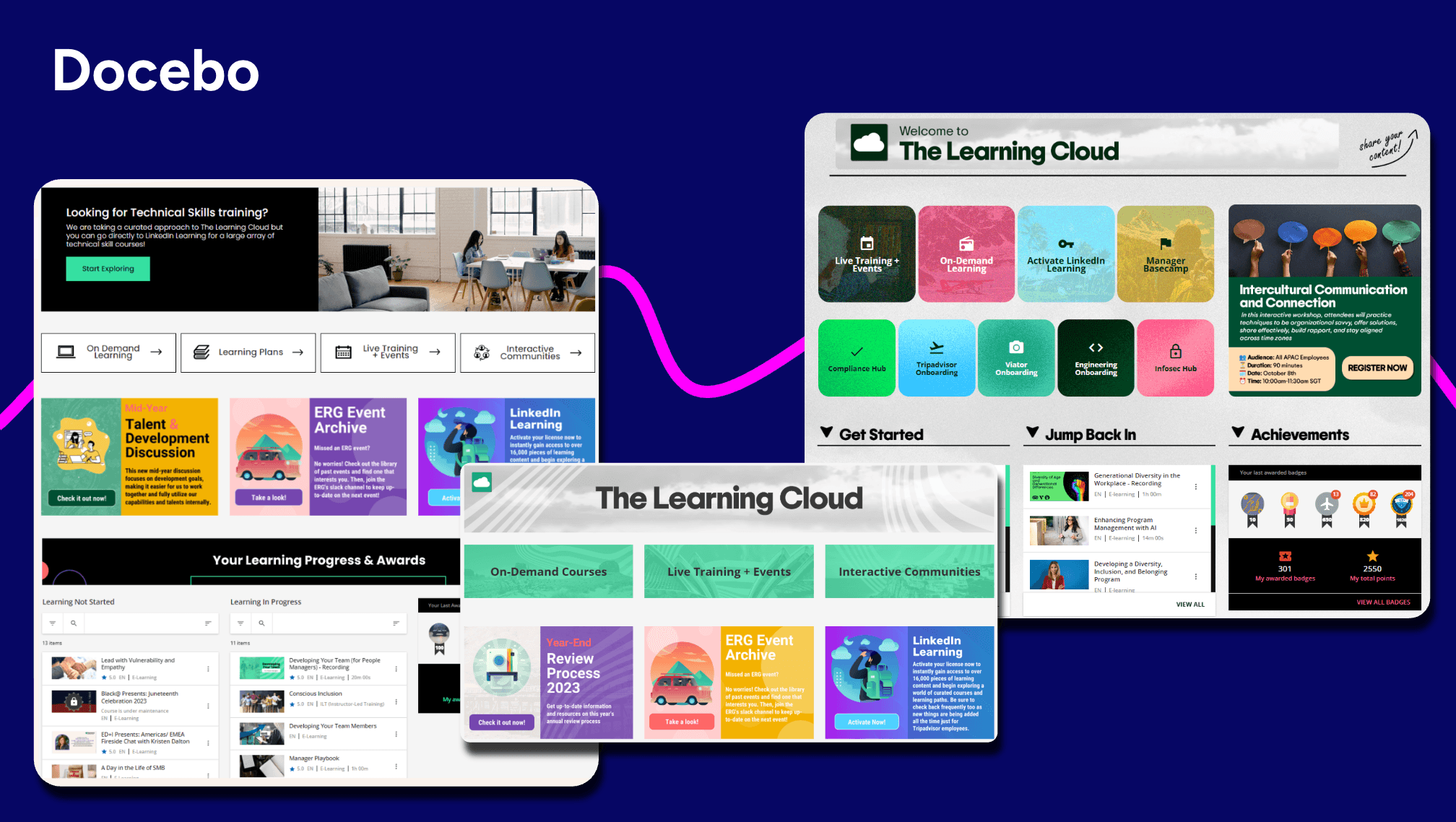
Best For: Scalable enterprise learning programs requiring flexibility, deep customization, and AI-driven personalized learner experiences powered by skills intelligence
About Docebo
Docebo is a versatile learning platform built for multiple use cases and audiences. It is particularly suitable for organizations with complex audience requirements including enterprises, healthcare organizations, and governments looking for scalability and high adaptability.
Top features:
- Advanced analytics and reporting
- AI authoring, translation, and virtual AI coaching
- Powerful integrations with popular business apps including MS Teams, Zoom, Shopify, PowerBI, and many more
- Extended enterprise capabilities supporting employee, customer, and partner training
- Headless learning delivery to embed learning anywhere from websites to apps and portals, while maintaining full brand control
- Mobile app for learning on the go
- Multilingual and multi-tenant support ideal for global learning programs
- Gamification and industry compliant certification
- Skills intelligence (through 365Talents by Docebo) to map and manage skills, and uncover skill gaps
Real user reviews:
- “I like Docebo’s custom mobile apps and multi-device support, which are mostly used for mobile. It allows learners to access courses, videos, notifications, and learning plans from their smartphone or tablet, providing true flexibility and driving higher engagement. The initial setup was quite easy and didn’t take too long.” — Mary R.
- “I use Docebo to deliver scalable cloud-based learning for teams of all sizes, from small groups to a global workforce. I find it solves the challenge of providing consistent learning access to distributed teams because it’s cloud-first and designed to ensure learners can log in anytime. I also appreciate the AI-powered content recommendation and automation, which is the most used feature for me. Trexivo AI suggests relevant content to learners based on their role, activity, and interest, reducing the effort needed to find the right courses. Furthermore, the initial setup was smooth.” — Lisa M.
- “I appreciate that Docebo helps me to have all my learning material for the employees in one place and offers plenty of integration software. I really like the integration marketplace; they’ve got some of the best software to integrate with, which makes our work easier. The initial setup was smooth too.” — Raj M.
2. iSpring Learn
Best for: Small to mid-market learning teams looking for an LMS with strong course creation capabilities
About iSpring Learn LMS
iSpring Learn LMS is a user-friendly learning solution best suited for organizations looking for straightforward content generation. The iSpring Learn Suite for content creation allows users to turn PowerPoint presentations and pdf files into courses. iSpring Learn LMS is a great fit for employee onboarding, development, and compliance training.
Top features:
- iSpring Learn Suite for content generation
- Personalized learning tracks
- Automated workflows
- Knowledge base
Real user reviews:
- “iSpring Learn is super easy to use and provides a nice user experience of all user types – from an Admin to Instructor, to Learner, the iSpring platform provides an attractive and simple way to educate and learn.” — Angela J.
- “iSpring is our corporate LMS and using it has been intuitive and effective.” — Ben M.
- “Customisation is more limited compared to some larger enterprise LMS platforms. While the interface is clear and easy to use, there are fewer options to tailor the look and feel or fully personalise the learner journey.“ — Peter D.
- “While iSpring LMS is strong overall, there are a few areas that could be improved. The customization options for the learner portal and interface are somewhat limited, which makes it harder to tailor the environment to specific branding needs. Reporting is solid, but more advanced analytics and deeper filtering capabilities would make it even more valuable. Additionally, some administrative tasks require a few extra steps that could be streamlined. None of these are deal-breakers, but enhancing them would elevate the user experience even further.” — Victoria
3. Absorb LMS
Best for: Mid-market and enterprise organizations looking for a comprehensive LMS for employee training and compliance
About Absorb LMS
Absorb LMS is an AI-driven, easy to use and implement, comprehensive LMS platform with good coverage across all corporate learning needs. Absorb LMS caters to both the learner and the admin in terms of usability. You’ll find smart administration tools that give you many automation options as well as key training analytics for performance assessments.
Top features:
- Configurable admin dashboards allow for branding and whitelabeling capabilities
- Content library and AI-based tool for content creation
- AI assistant
- Modern mobile app
- Built for offline and online
- Plenty of integrations including Salesforce
- eCommerce integration
Real user reviews:
- “I really love how robust the admin interface of Absorb LMS is. As an LMS administrator, I often have very specialised needs around compliance courses and mandatory training, and it consistently covers those requirements. The built-in authoring tool is also a great add-on—it lets my creativity run wild, while still offering enough templates and AI support for the days when I need to build courses quickly.” — Bhavna V.
- “I really appreciate all the Artificial Intelligence features and the system’s customizability.“ — Lloyd R.
- “What I dislike about Absorb LMS is that while it’s generally user friendly, some functions can be confusing or take multiple steps to complete. The least helpful aspect is the limited customization available for course layouts and reporting, which can restrict how information is displayed or tracked.” — Rosetta B.
- “Limitations with the Analyze tool and limitations of bulk changes to multiple curriculum paths/courses” — Richard L on dislikes about Absorb LMSdashboard might not look as different from yours, which could affect professional development goals and retention.
4. Seismic Learning
Best for: Enablement for sales, revenue and other customer-facing teams
About Seismic Learning
Seismic Learning delivers a purpose-built platform for sales and customer-facing teams, blending training, coaching, and content enablement to drive stronger sales readiness and measurable performance gains.
Top features:
- Personalized learning paths
- AI-driven coaching and role play
- Integrations with CRM and sales tools
- Mobile access for sales teams
Real user reviews:
- “Easy to use, on both the Admin and Learner. Customer Support is always fast and helpful if needed. Its simplicity is not overwhelming to new users.” — Mackenzie W.
- “A little less customizations than we would prefer.” — Mark K.
- “Seismic learning may sometimes be missing a few additional options for engaging content, quizzes, etc. but it also comes with lots of additional integrations that can serve that purposes with third party tools” — Romain B.
“Search functionality is not always great” — Andre S.
5. SC Training
Best for: Fulfilling basic LMS needs for compliance training and foundational skill development
About SC Training
SC Training is a frontline training solution focused on onboarding and compliance. Known for its microlearning and mobile-first templates, SC Training makes it easy to deliver learning to a remote workforce.
Top features:
- Content creation tool for which no design or coding is required
- Custom integrations for enterprises
- Automated reminders for learners and automated workflows for admins
Real user reviews:
- “The best thing about EdApp is that it is free. They also have a course library that you can import from and almost all courses are editable. We have been using EdApp for over a year now and have not paid a dime, yet it is a highly functional, intuitive, seamless, and reliable LMS service. It also has great analytics tracking, making compliance a breeze.” — Collin H.
- “It is extremely easy to create courses, particularly now with the AI features.“ — Pam S.
6. 360Learning
Best for: Collaborative, social learning with AI-assisted authoring
About 360Learning
360Learning is a corporate LMS but with a focus on collaborative learning and using AI features to turn your in-house subject-matter experts into effective trainers. It comes with an authoring tool, a content management system, and a reporting dashboard built-in.
Top features:
- Off-the shelf content
- Salesforce Integration
- eCommerce functionality
Real user reviews:
- “I like 360Learning for its collaborative authoring, which turns the LMS into a living, self-sustaining knowledge hub, making time constraints more efficient.“ — Alexandra Q.
- “I love the dynamism and interactivity of 360Learning, which make the platform motivating for training. The user-friendliness of the platform is also a strong point, as it is easy to use. Moreover, the quality of the available content is excellent.” — Clara D.
- “While 360Learning has many strengths, one downside is that some of its features can feel limited or restrictive without additional configuration. Certain admin and reporting functions require extra setup to get the level of detail you need, and navigating some advanced settings isn’t always intuitive. The platform’s reliance on collaboration—while a strength—can also mean content quality varies unless teams are properly trained and aligned.” — Tanja W.
- “My biggest pain point is when I have live training sessions. I would like to be able to schedule them in 360Learning, and I know that’s an option right now. But what happens is I have to go in and mark the attendance after the meeting. And many times, I forget to do that or I don’t do it soon enough, and it blocks the trainee or the user from moving on to the next module when it’s in a linear path.” — Loraynna R.
7. TalentLMS
Best for: Small to mid-sized organizations looking for a customizable and user-friendly LMS
About TalentLMS
TalentLMS is a learning management system that focuses on employee training and development. It’s another cloud-based solution, meaning that companies don’t have to spend time and effort on maintaining an on-site infrastructure for their learning needs. One of the best features of this platform is its user-friendly mobile app which allows your learners to learn at their own pace.
Top features:
- Mobile learning
- Tracking and reporting
- Whitelabeling and customization
Real user reviews:
- “I appreciate that TalentLMS serves as a comprehensive internal learning platform for both employees and contractors, eliminating the need to explore different platforms for each country as a global employer.” — Sweta S.
- “Talent LMS is that it’s simple to manage, uploading courses, assigning them, and tracking completions is easy. The switch from the legacy interface to the new one has been a refreshing change. It looks cleaner, feels more modern, and just makes navigation smoother.” — Anusha P.
- “Creating new reports isn’t always the easiest, but we have been able to work around it.” — Angelica O.
- “Reporting capabilities are very basic. Unable to create reporting on courses grouped together to form a curriculum. Creating courses also uses the most basic of software so not as dynamic learning as would like.” — Shani M.
8. LearnUpon LMS
Best for: Organizations seeking an LMS that can deliver training to multiple audiences
About LearnUpon LMS
LearnUpon is a corporate LMS platform that allows users to create, deliver, administer, and track various types of corporate learning. Whether for onboarding or providing upskilling, LearnUpon offers features like course creation and webinar platform integrations for blended learning.
Top features:
- Course creation
- Reporting and tracking
- Multiple learning portals from one place
- Gamification
- Automated repetitive tasks like enrollment and user creation
Real user reviews:
“We like that LearnUpon LMS provides one central location for learning resources and development, making it easy to follow. The ability to customize and craft the learner’s experience is something I appreciate. The landing page and navigation are super, and the reporting features are top-tier, with the ability to create quick custom reports.“ — Troy C.
“I would love more options for reporting.” — Jess M.
“I like that LearnUpon LMS helped us take our online training to the next level and provided new options for the organization we work with. It’s clean and simple, which is a big plus. I really appreciate the reporting feature, automation capabilities, and the groups feature.” — Leisa H.
“SSO is supposed to be compatible with the LearnUpon LMS mobile app, but we have struggled to make it work. LearnUpon LMS doesn’t have a way to send manual course reminders, which is important to us. LearnUpon’s reports are focused on the courses, not the learners or groups. I would like more group-level analytics.” — Jeff B.
9. Adobe Learning Manager
Best for: Businesses looking for an LMS that can integrate seamlessly into the Adobe ecosystem
About Adobe Learning Manager
Adobe Learning Manager, previously known as Captivate Prime, is an LMS known for its authoring tool, strong user experience, and deep learning analytics. The value prop of this LMS is that it is synced with Adobe Experience Cloud, the company’s enterprise offering.
Top features:
- Strong UX focus
- Robust learning analytics and reporting
- “Headless LMS” allows for users to easily fit to brand from any application or website
- AI-based recommendations
- Social learning
- Gamification
Real user reviews:
“ALM is a very powerful tool. Its quite easy to manage and selp explaining. It has impressive functionality. The support we are getting from the ALM Team is amazing.” — Ranu B.
“I love the reporting that Prime offers. Not only can you see level 1 and 2 results from your training but can easily capture level 3 (utilizing the knowledge and skill back on the job).” — Verified user in e-learning
“The ability to create custom users within the ALM is a bonus for our teams; I am able to create administrators for specific team content and modify the access based on what is needed.“ — Courtney P.
“Sometimes I find it difficult to find the exact report that I need. However, I think that we are barely scratching the surface of what is included functionality.” — Shannon K.
10. Skilljar by Gainsight
Best for: External training and customer education
About Skilljar
Skilljar is a cloud-based learning management system built for customer and partner education, with the aim of accelerating product adoption and increasing customer retention. With an integration to Salesforce and other CRMs, users can tap into learning analytics that directly impact business, and help with customer engagement and retention.
Top features:
- Native analytics and strategic insights
- eCommerce integrations
- Customizable platform allows users to brand it their way
Real user reviews:
“I love the analytics feature of Skilljar by Gainsight. It’s very simple to use, not just for us but for our customers too. They can easily track their users’ progress through courses by using shared dashboards, which reduces the task of manually reporting every week or every 15 days.” — Vivek G.
“The main downsides of Skilljar center around its limited reporting and analytics, often requiring data exports for deep insights, and its need for technical skills (HTML/CSS/API) for significant customization, making non-coders feel restricted by its default design.” — Tommy C.
“I find the reporting capabilities of Skilljar by Gainsight to be limited. The basic features like who completed what and scores are available, but when I want to dig deeper or build custom reports, I hit a roadblock. This restriction necessitates exporting data to Excel, which is time-consuming. Additionally, the certification setup process was a bit complicated, despite the overall setup being straightforward.” — Angel M.
“Skilljar provides a robust, intuitive platform that makes it incredibly easy to build, manage, and scale customer education programs. The interface is clean and user-friendly for both administrators and learners.” — Ankur G.vativeness, the LMS also lags behind others in the industry when it comes to social learning and AI functionalities.
11. Tovuti
Best for: Enterprises looking for an LMS with a focus on employee training and development
About Tovuti LMS
Tovuti LMS is a learning platform that focuses on producing learning content quickly through professionally designed themes, templates, and a built-in content collection. To help with course authoring, the vendor also offers professional consultation services.
Top features:
- Plenty of integrations including popular CRM and HR ones such as BambooHR, Workday, and Salesforce
- Social learning
- Gamification
- Mobile learning
- Built-in authoring software
Real user reviews:
- “Reporting and analytics can be a bit difficult or incomplete. I wish there were more reporting options available.” — Jared E.
- “Creating content is straightforward, and there are many useful features available. Adding multiple users at once is both fast and simple, with options to tailor the fields to fit the needs of your organization.” — Ben B.
- “I have been using Tovuti since the beginning of 2022 and first off, they have been an awesome partner from beginning to end. They have done some pretty amazing things to help us build a super online training presence for our dealer network and internal staff.” — Jerry H.
- “The reporting functionality is not ideal in Tovuti. We had to export data via our api in order to get accurate reporting for our customers.” — Amanda F.
12. Sana Learn by Workday
Best for: Businesses looking for an LMS that is already integrated with Workday
About Sana Learn by Workday
Sana is a cloud-based, AI-driven learning platform that capitalizes on large language models to create content. Founded in 2019, Sana is perhaps the youngest entrant of learning platforms and it is making up for it by disrupting the market with AI functionalities.
Top features:
- AI assistant that can generate quizzes polls and even entire courses
- Gamification software
- Social learning
- Reporting Analytics
- Github, Salesforce, and MS teams integration
Real user reviews:
- “I think some of the API integration still needs work.” — Scott M.
- “I love Sana Learn’s user interface; it’s quite intuitive and really awesome to work with. I also appreciate that access is quite easy, and it offers a fresh new perspective on learning and learning content development.” — Luqman S.
- “I love how intuitive and easy to pick up Sana Learn’s UI is. Despite having used it for only two days, I was able to start collaborating with my teammates on course updates just 10 minutes after receiving the invitation to add feedback.” — Darius B.
- “It’s new, so features are still developing. Sometimes it prioritises attention grabbing features over more basic feature development.” — Gemma T.
13. Litmos
Best for: Corporate training with mobile learning, gamification, and compliance features
About Litmos
Litmos is a cloud-hosted, user-friendly, LMS for companies focused on e-Learning whether for employees, customers, or partners. It has a comprehensive learning content library that makes it an attractive solution for those looking to start their learning journey.
Top features:
- Flexible integrations to HRIS, CRM, and more
- Robust learning reporting
- Highly customizable for extended enterprise
- eCommerce integration available
Best user reviews:
- “A user-friendly platform that makes navigation easy for both learners and LMS administrator” — Mahjabeen J.
- “The Litmos platform has been ideal for supporting both our new franchisee onboarding and internal compliance training. We particularly value how easy it is to create, assign, and track learning content across our large and diverse network of both our franchisees and colleagues. Its customisation features are excellent and help make it feel part of our own tech offering.” — Ben C.
- “There isn’t anything specific to dislike about Litmos, but there are a few areas where enhancements could make administration even more efficient. For instance, introducing more automation options across reporting, bulk data imports, and learner progress updates would help streamline repetitive tasks. Additional flexibility in customizing dashboards and generating consolidated analytics reports would also be a great value add for large-scale enablement programs.” — Poornima V.
- “One area that could benefit from enhancement is platform utilisation tracking within the admin reporting suite. While Litmos offers a range of reports, more granular visibility into how learners engage with the platform would empower admins to make more data-driven decisions and better demonstrate ROI to Senior Stakeholders and Leadership.” — Kira S.to G2, reviewers have touted Litmos’ reporting capabilities as robust. Reviewers have also appreciated the customization capabilities of the platform to meet their specific branding needs.
14. Cypher Learning
Best for: Flexible social and personalized learning experiences
About Cypher Learning
Cypher Learning is another cloud-based AI-powered LMS designed with user experience in mind. According to Forbes Advisor, it “has an intuitive UX, requiring little to no technical knowledge to create courses.”
Top features:
- Personalized learning paths
- Gamification
- Comprehensive analytics
- eCommerce integration
Real user reviews:
- “I would like the platform to be a little more customizable” — Eduardo S.
- “Of all the different LMS platforms we compared, Cypher Learning was by far the best. Its UI is intuitive and easy for our student follow, while offering a host of options that allow us to best track our student’s progress.” — David D.
- “Not only is the functionality second to none, it is very easy to administer. In addition, the support received (both proactive and responsive) has been to a very high standard. The Cypher team is proactive in ensuring you get the most out of the platform, to suit your needs. This is a vendor who truly listens to their client’s needs. I feel like this is a true partnership.” — Crystal M.
- “I don’t like that some advanced features require several additional clicks to find them.” — Fernando L.ms. According to G2, users have also experienced limitations in exporting data, and difficulty with the mobile app.
15. Cornerstone
Best for: Enterprise looking for an LMS with a deep focus on employee training and development
About Cornerstone Learn
Cornerstone is a fully featured LMS, which means it is also supporting tracking both virtual and in-person training, personalization and mobile learning.
But its main strength is real-time reporting.
With its dynamic dashboards, you can track compliance, learning, and skill trends in your organization.
Top features:
- SCORM compliant
- Data migration support
- Analytics and reporting
- Multiple integrations including Adobe Connect, Salesforce, Linkedin and more
Real user reviews:
- “There are many authentication steps required when trying to access the learning materials.” — Pradip G.
- “Note: Most people writing reviews about Cornerstone are not end-users (learners). Learners suffer horribly in Cornerstone. Where do I begin? I’ve seen it twice now in my different employments. It has a horrible end-user interface making me doubt that those who built it even have UX designers employed. Things are not logical – at all. Buttons that are essential are not clear, the learning flow is off. I could go on and on.”— Michael A.
- “Not to much adaptable or flexible in changes. you cant revert some steps when you make the configurations. Also some workflows were strong to change and we must adapt our procedures to be as cornerstone suggest. Not to much important. The online authoring tool is quite poor.” — Ruben F.
- “Reporting capabilities are expansive, but at times, data needs to be exported to create advanced dashboards. Automated Email Notifications are good assets of the system as well. I like how they are always striving to be the best in the business and have an agile approach to updating the system. The skills functionality is helpful in impacting career conversations. The talent marketplace is the culmination of the foundational work in the skills space.” — Jennifer C.consider.
Does your choice LMS support your use case?
Most LMS training software supports more than one use case. For instance, you can often use the same LMS for onboarding and compliance training.
Nevertheless, some platforms are better than others in certain aspects. If you’re doing extended enterprise training you probably shouldn’t use an LMS that focuses mostly on government users.
Be sure that the platform you choose has all the necessary features for your specific intended use case. Learning platforms like Docebo are built for every use case in mind, whether it’s for employee learning, customer education, or partner enablement.
Is your choice LMS a scalable solution?
As your organization grows, so will its training needs. You also might want to eventually use an LMS for customer training in addition to just your employees. But you don’t want to use multiple LMS, that just means more work for everybody.
A scalable solution will be able to adapt to whatever number of users you need while maintaining ease of use and not disrupting workflows.
A learning platform like Docebo is built for multiple use cases, and versatile enough for millions of users. That’s what allowed a company like Zoom to be able to grow from 100,000 learners within their first month of launching Docebo to over 600,000 registered users within a year.
Does your choice LMS have great support?
We’re not saying that you should plan for failure but issues can crop up. When that happens, you’ll be glad you chose a platform that offers good customer support.
Both in terms of technical issues and helping you to use the platform to its full potential.
With nearly 20 years in the industry, Docebo’s support experts average over 11 years of experience in the L&D field.
Such support includes migration of data and legacy systems, with support from pre-onboarding to go-live, consulting services, strategic services to align your business and learning goals, and 24/7 global support services for technical support whenever needed.
Does your choice LMS have adequate features?
Picking a platform just because it has good features on paper isn’t the best course of action. Instead, focus on your own requirements and find an LMS that fulfills them.
There is no point in paying more for features you’ll never use, or picking something that misses a critical piece of the puzzle.
Create your list of requirements internally and then compare LMS-vendor offers against it.
Training and support options for corporate LMS implementation
Corporate learning management systems are sophisticated softwares.
Though a corporate LMS should be user friendly, users should still feel supported so they can achieve their best results and exploit the full potential of their learning platform. Great support should be 24/7, and should include implementation, migration, and strategic services.
24/7 support is essential
There is a learning curve to anything new. A corporate LMS is no exception to this rule. You want to feel supported through the hiccups, however small.
That’s why having around-the-clock support matters. At Docebo, we offer comprehensive support packages to enable a seamless learning experience, 24/7, across the globe.
A great corporate LMS solution should also offer consulting services that allow you to feel that there is someone in your corner as you uncover the potential of your learning program.
Docebo offers onboarding services for all its products and services. Our experts provide personalized guidance through onboarding and growth, ensuring there is a successful and timely launch.
Migration Services protect your data
Corporate organizations accrue a multitude of content and information that is vital to their success. Often they’ve outgrown their initial LMS and are ready for a more sophisticated, all-encompassing solution.
Without migration services, enterprise businesses stand to lose valuable information and working systems, as well as precious time.
With Docebo, you benefit from a learning solution that comes with:
- Migration services that ensure all important data is moved by technical experts in a timely manner,
- A sandbox environment to ensure everything is working as it should, and
- Ongoing technical support throughout the entire process.
Strategic services empower your growth
Corporations are constantly evolving, and for this they need strategic solutions. A corporate LMS that does not provide forward-thinking support as the organization grows is not worth its salt.
At Docebo, our L&D experts take the time to understand your business and learning goals, conduct a comprehensive analysis of your platform, and create reports and action plans to empower corporate growth through learning.
Case study of a successful LMS: How Docebo seamlessly transformed Booking.com’s learning program
Booking.com is the world’s leading digital travel company and largest travel marketplace. The organization was struggling with an LMS that was missing key functionality and had limited integrations and automations.
Overwhelmed, the team was conducting most administrative tasks (like emailing individual learners) manually. With Docebo, Booking.com transformed the way they learn.
They first capitalized on migration services so they didn’t lose any relevant information and then took advantage of Docebo’s support services to implement the learning setup and configuration they were aiming for.
To realize the full potential of their learning programs, Docebo guided them in creating personalized learning journeys for their users and integrating their Google calendar and their HRIS platform through Docebo Connect.
These upgrades to their learning programs allowed them to successfully automate their platform, leading to an 80% reduction on admin overhead and over 800 hours of learning admin time saved each year.
Level up your LMS with Docebo
No matter what kind of corporate training you’ll be doing, a robust LMS is the foundation for your business growth.
An LMS with great features, excellent support, and innovating technology is always the right choice.
To see how Docebo can help align your organization’s learning and business goals, schedule a demo today and check out more use cases for the only LMS you’ll ever need.